
Indian Institute of Science (IISC) Admission Photo and Signature Converter, Resizer, Compressor Online
Using this free online IISc Admission Photo and Signature Resizer you can resize, crop, convert, and compress your photo and signature to the exact IISc specification. Select IISc, upload your image, and download a file at 150 x 184 px, in JPEG, under 500 KB.
الاستخدام Indian Institute of Science (IISC) Admission Photo and Signature Converter, Resizer, Compressor Online
Exam Photo & Document Tool
Drag & drop your image
JPG, PNG, WebP supported
قراءة المحتوى
What the IISc and JAM admission process is
The Indian Institute of Science runs postgraduate and research admissions, and it also participates in the Joint Admission Test for Masters, which is conducted jointly by the IITs and IISc on behalf of the Ministry of Education. JAM is organised by a different institute each year, and IISc handled the 2021 edition. It admits candidates into M.Sc., M.Sc.-Tech and joint M.Sc.-Ph.D. programmes across the IITs, IISc, the NITs, the IIITs and the IISERs, with seats filled through centralised counselling and no further written test or interview for those who qualify.
That is why the record carries two separate sets of figures. The direct institute admission uses a 150 by 184 pixel photograph and a 300 by 40 pixel signature, both quoted in pixels, while the JAM route uses the standard 3.5 by 4.5 centimetre and 3.5 by 1.5 centimetre frames at 200 DPI. The JAM signature box of 7 by 2 centimetres is noticeably wider than the usual 1.5 centimetre height, so a signature prepared to the common narrow proportion will not fill this frame correctly.
The board publishes its advertisements at www.iisc.ac.in. The numbers on this page come from the recorded specification, and the notification on that site is the authority whenever the two differ.
This page sets out the numbers IISc actually asks for. It is not a general guide to cropping or to the tool interface, because those instructions do not change from one exam to the next and they are written up separately.
What the IISc form asks you to upload
There are two separate uploads to prepare. They are:
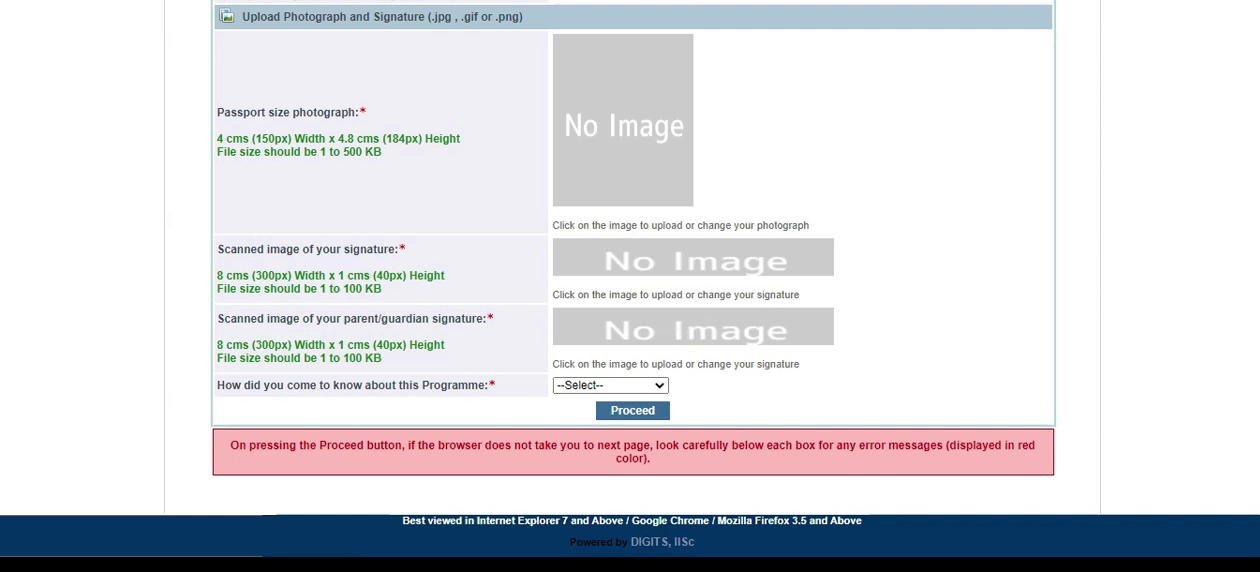
- A photograph at 150 x 184 px, no heavier than 500 KB and no lighter than 50 KB.
- A signature at 300 x 40 px, no heavier than 100 KB and no lighter than 50 KB.
| Item | Size | Unit | Format | Max file size | Min | DPI |
|---|---|---|---|---|---|---|
| Photo | 150 x 184 | px | JPEG | 500 KB | 50 KB | 96 |
| Photo | 3.5 x 4.5 | cm | JPEG | 200 KB | 50 KB | 200 |
| Signature | 300 x 40 | px | JPEG | 100 KB | 50 KB | 96 |
| Signature | 7 x 2 | cm | JPEG | 100 KB | 50 KB | 200 |
The IISc numbers, and why they matter
IISc publishes its sizes in both units, which means the record is offering two ways to express the same kind of requirement. Pick the row that matches how your own advertisement is worded: centimetres when the notification states a physical frame, pixels when it states a resolution. They are alternatives published for different notifications, not a sequence to apply in turn.
Resolution appears more than once in the IISc record, at 200 and 96 DPI. That is not a contradiction: the physical frame is the same in both, and the choice is how densely the image is stored. Where an advertisement is silent, the 200 DPI row is the safer one, because a denser image still measures correctly at a lower resolution while the reverse is not true.
Worth knowing that IISc works in both directions. The photograph must be no larger than 500 KB and no smaller than 50 KB, and the signature no larger than 100 KB with 50 KB as its floor. Overshooting the ceiling is the usual mistake; undershooting the floor is the one that surprises people who compress hard.
If the IISc application refuses your file
- A IISc rejection usually comes down to one of two things. Either the file is over 500 KB because the crop left too much empty background, or the photo itself has a non plain background, a tilt, or a filter. Fix the weight first since it is measurable, then the photograph.
- The signature is judged on its own 300 x 40 px box and is not rescued by a correct photograph. If it is rejected, the usual cause is loose cropping: a signature scanned with a wide white margin carries more weight than the 100 KB allowance and fails even though the writing itself looks right.
- Two identical rejections usually mean the specification moved rather than the file. Compare the table above against the current notification before you generate a third attempt.
Official links from the original page
- iisc.ac.in/admissions/instructions/
- jam.iisc.ac.in/p/photograph-requirements-2
- jam.iisc.ac.in/p/signature-requirements-1
Images from the original page
Frequently Asked Questions
The mechanics of the crop step, the face mask overlay, and the compression trade-off are identical across all of these tools, so they have their own guide instead of a section on every page. Read the complete photo and signature guide.
الأسئلة الشائعة
Suggested Tools








التعليقات (0)
يرجى وصف المشكلة التي واجهتها حتى نتمكن من التحقيق فيها وتحسين الأداة.