
AIIMS Photo, Signature and Thumb Impression Resizer, Converter and Compressor
AIIMS Photo, Signature and Left Thumb Impression Resizer, Converter and Compressor tool will resize, convert and compress your AIIMS photo, signature and thumb impression according to AIIMS guidelines.
ব্যবহার করুন AIIMS Photo, Signature and Thumb Impression Resizer, Converter and Compressor
Exam Photo & Document Tool
Drag & drop your image
JPG, PNG, WebP supported
বিষয়বস্তু পড়ুন
Table of Contents
[hide]
AIIMS Photo, Signature and Left Thumb Impression Resizer, Converter and Compressor
AIIMS Photo, Signature and Thumb Impression Resizer, Converter and Compressor tool will resize your photo 3.5x4.5cm, signature 6x3cm and left thumb impression 4x3cm in 200 dpi, convert your photo jpeg (jpg/gif/png) format and compress your photo 50-100KB, and your signature and left thumb impression 10-50KB, according to AIIMS Photo, Signature and Thumb Impression guidelines
AIIMS Photo, Signature and Left Thumb Impression dimensions, size, format and file name 2023
AIIMS Photo dimensions, size, format and file name 2023
- AIIMS Photo dimensions are 3.5x4.5cm (width x height), 200 DPI
- AIIMS Photo size should be between 50-100KB
- AIIMS Photo formats are jpg/jpeg, gif, png
- AIIMS Photo filename should be Photograph, ex: Photograph.jpg , Photograph.jpeg, Photograph.png, Photograph.gif
AIIMS Signature dimensions, size, format and file name 2023
- AIIMS Signature dimensions are 6x3cm (width x height), 200 DPI
- AIIMS Signature size should be between 10-50KB
- AIIMS Signature formats are jpg/jpeg, gif, png
- AIIMS Signature filename should be Signature, ex: Signature.jpg , Signature.jpeg, Signature.png, Signature.gif
AIIMS Left Thumb Impression dimensions, size, format and file name 2023
- AIIMS Left Thumb Impression dimensions are 4x3cm (width x height), 200 DPI
- AIIMS Left Thumb Impression should be between 10-50KB
- AIIMS Left Thumb Impression formats are jpg/jpeg, gif, png
- AIIMS Left Thumb Impression filename should be Left Thumb Impression, ex: Left Thumb Impression.jpg , Left Thumb Impression.jpeg, Left Thumb Impression.png, Left Thumb Impression.gif
AIIMS BSc Photo, Signature and Left Thumb Impression Resizer, Converter and Compressor
AIIMS BSc Photo, Signature and Thumb Impression Resizer, Converter and Compressor tool will resize your photo 3.5x4.5cm, signature 6x3cm and left thumb impression 4x3cm in 200 dpi, convert your photo jpeg (jpg/gif/png) format and compress your photo 50-100KB, and your signature and left thumb impression 10-50KB, according to AIIMS BSc Photo, Signature and Thumb Impression guidelines
AIIMS BSc Photo, Signature and Left Thumb Impression dimensions, size and format and file name 2023
AIIMS BSc Photo dimensions, size, format and file name 2023
- AIIMS BSc Photo dimensions are 3.5x4.5cm (width x height), 200 DPI
- AIIMS BSc Photo size should be between 50-100KB
- AIIMS BSc Photo formats are jpg/jpeg, gif, png
- AIIMS BSc Photo filename should be Photograph, ex: Photograph.jpg , Photograph.jpeg, Photograph.png, Photograph.gif
AIIMS BSc Signature dimensions, size, format and file name 2023
- AIIMS BSc Signature dimensions are 6x3cm (width x height), 200 DPI
- AIIMS BSc Signature size should be between 10-50KB
- AIIMS BSc Signature formats are jpg/jpeg, gif, png
- AIIMS BSc Signature filename should be Signature, ex: Signature.jpg , Signature.jpeg, Signature.png, Signature.gif
AIIMS BSc Left Thumb Impression dimensions, size, format and file name 2023
- AIIMS BSc Left Thumb Impression dimensions are 4x3cm (width x height), 200 DPI
- AIIMS BSc Left Thumb Impression should be between 10-50KB
- AIIMS BSc Left Thumb Impression formats are jpg/jpeg, gif, png
- AIIMS BSc Left Thumb Impression filename should be Left Thumb Impression, ex: Left Thumb Impression.jpg , Left Thumb Impression.jpeg, Left Thumb Impression.png, Left Thumb Impression.gif
AIIMS PG Photo, Signature and Left Thumb Impression Resizer, Converter and Compressor
AIIMS PG Photo, Signature and Thumb Impression Resizer, Converter and Compressor tool will resize your photo 3.5x4.5cm, signature 6x3cm and left thumb impression 4x3cm in 200 dpi, convert your photo jpeg (jpg/gif/png) format and compress your photo 50-100KB, and your signature and left thumb impression 10-50KB, according to AIIMS PG Photo, Signature and Thumb Impression guidelines
AIIMS PG Photo, Signature and Left Thumb Impression dimensions, size and format and file name 2023
AIIMS PG Photo dimensions, size, format and file name 2023
- AIIMS PG Photo dimensions are 3.5x4.5cm (width x height), 200 DPI
- AIIMS PG Photo size should be between 50-100KB
- AIIMS PG Photo formats are jpg/jpeg, gif, png
- AIIMS PG Photo filename should be Photograph, ex: Photograph.jpg , Photograph.jpeg, Photograph.png, Photograph.gif
AIIMS PG Signature dimensions, size, format and file name 2023
- AIIMS PG Signature dimensions are 6x3cm (width x height), 200 DPI
- AIIMS PG Signature size should be between 10-50KB
- AIIMS PG Signature formats are jpg/jpeg, gif, png
- AIIMS PG Signature filename should be Signature, ex: Signature.jpg , Signature.jpeg, Signature.png, Signature.gif
AIIMS PG Left Thumb Impression dimensions, size, format and file name 2023
- AIIMS PG Left Thumb Impression dimensions are 4x3cm (width x height), 200 DPI
- AIIMS PG Left Thumb Impression should be between 10-50KB
- AIIMS PG Left Thumb Impression formats are jpg/jpeg, gif, png
- AIIMS PG Left Thumb Impression filename should be Left Thumb Impression, ex: Left Thumb Impression.jpg , Left Thumb Impression.jpeg, Left Thumb Impression.png, Left Thumb Impression.gif
AIIMS NORCET Photo, Signature and Left Thumb Impression Resizer, Converter and Compressor
AIIMS NORCET Photo, Signature and Thumb Impression Resizer, Converter and Compressor tool will resize your photo 3.5x4.5cm, signature 6x3cm and left thumb impression 4x3cm in 200 dpi, convert your photo jpeg (jpg/gif/png) format and compress your photo 50-100KB, and your signature and left thumb impression 10-50KB, according to AIIMS NORCET Photo, Signature and Thumb Impression guidelines
AIIMS NORCET Photo, Signature and Left Thumb Impression dimensions, size and format and file name 2023
AIIMS NORCET Photo dimensions, size, format and file name 2023
- AIIMS NORCET Photo dimensions are 3.5x4.5cm (width x height), 200 DPI
- AIIMS NORCET Photo size should be between 50-100KB
- AIIMS NORCET Photo formats are jpg/jpeg, gif, png
- AIIMS NORCET Photo filename should be Photograph, ex: Photograph.jpg , Photograph.jpeg, Photograph.png, Photograph.gif
AIIMS NORCET Signature dimensions, size, format and file name 2023
- AIIMS NORCET Signature dimensions are 6x3cm (width x height), 200 DPI
- AIIMS NORCET Signature size should be between 10-50KB
- AIIMS NORCET Signature formats are jpg/jpeg, gif, png
- AIIMS NORCET Signature filename should be Signature, ex: Signature.jpg , Signature.jpeg, Signature.png, Signature.gif
AIIMS NORCET Left Thumb Impression dimensions, size, format and file name 2023
- AIIMS NORCET Left Thumb Impression dimensions are 4x3cm (width x height), 200 DPI
- AIIMS NORCET Left Thumb Impression should be between 10-50KB
- AIIMS NORCET Left Thumb Impression formats are jpg/jpeg, gif, png
- AIIMS NORCET Left Thumb Impression filename should be Left Thumb Impression, ex: Left Thumb Impression.jpg , Left Thumb Impression.jpeg, Left Thumb Impression.png, Left Thumb Impression.gif
Instructions related to uploading of Photographs, signature and left thumb impression
Instruction for photograph file upload:
- Registration slip will be generated only after uploading of Photo/Thumb/Signature and all other details.
- Uploading Photo/Thumb/Signature that are not as per the instructions is the most common reason for rejections of applications.
- Kindly read the Instruction carefully to avoid rejection of application. It is preferable to keep the properly taken Photo/ Thumb/ Signature before filing the application form.
PHOTOGRAPH
- One (1) recent color passport size photograph with white background is required. The dimensions of the photograph should be 3.5*4.5 cms (width*height).
- Black & White / Polaroid photographs are NOT acceptable. Photograph should not be taken by mobile phone camera.
- Photograph should be taken professionally, so that it may not blur while enlarging it.
- Photograph MUST be taken recently and should not be taken more than six months prior from the start of Online Registration.
- Draw a box having size 3.5 x 4.5 cms (width*height) on a plain white sheet and paste the photograph inside the box.
- Select the area having photograph only, not the whole sheet and scan the photograph on 200 dpi.
- Save the scanned image as “Photograph.jpg" (supported formats include jpg/jpeg, gif, png). Keep the size of image between 50 KB to 100 KB.
UPLOADING PHOTOGRAPH
Candidates must upload Photograph to correct specified field. Do not make any mistake in uploading Photograph
To upload Photograph.jpg"
|
a |
Click "Choose File" button right to the photograph field. |
|
|
b |
Select the scanned "Photograph.jpg" file from saved location and click "Open" button
(Sample Image) |
|

Instruction for Signature file upload:
- Draw a box having size 6x3 cms (width*height)on a plain white sheet and put the signature inside the box.
- Signature should be done with thick point Black/Blue pen only. Signatures having only Initials or done in CAPITAL letters are not acceptable.
- Scan the area having signature only not the whole sheet. Scan the signature on 200 dpi. It should not be blurred while enlarging it.
- Save the scanned image as "Signature.jpg". Supported formats of the image include jpg/jpeg, gif, png.Keep the size of the image between 10 KB to 50 KB.
UPLOADING SIGNATURE
Candidates must upload Signature to correct specified field. Do not make any mistake in uploading Signature.
To upload "Signature.jpg"
Click “Choose file” button right to the signature field.
Select the scanned "Signature.jpg" file from saved location and click "Open" button.

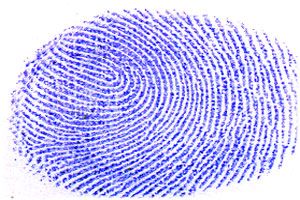
Instruction for Thump Print file upload:
- Draw a box of size 4 x 3 cms (width * height) on a plain white sheet.
- Take a good quality Blue/Black ink stamp pad.
- Put your left thumb gently on the stamp pad and role lightly in horizontal manner.
- The lines of the finger should be clearly visible in the print.
- Scan the area of white sheet having thumb impression only, not the whole sheet.
- Scan the left thumb impression on 200 dpi. It should not be blurred while enlarging it.
- Save the image as "Left Thumb Impression.jpg". Supported formats of the image include jpg/jpeg, gif, png.
- Keep the size of image between 10 KB to 50 KB.
UPLOADING LEFT THUMB IMPRESSION:
Candidates must upload Left Thumb Impression to correct specified field. Do not make any mistake in uploading Left Thumb Impression.
To upload "Left Thumb Impression.jpg"
Choose file” Button right to the Left Thumb Impression field.
Select the Scanned "Left Thumb Impression.jpg" file from saved location and click "Open" Button
মন্তব্য (0)
আপনি যে সমস্যার সম্মুখীন হয়েছেন তা বর্ণনা করুন যাতে আমরা তা তদন্ত করে টুলটি উন্নত করতে পারি।