
CUET Admission Photo and Signature Resizer, Converter and Compressor
Don't let resizing, converting, and compressing photos and signatures for the CUET (Common University Entrance Test) be a hassle for you. We're here to help! Upload your documents to us, and we'll ensure all the required dimensions, sizes, and formats meet the CUET guidelines. Say goodbye to errors and time-consuming processes—we've got you covered!
Verwendung CUET Admission Photo and Signature Resizer, Converter and Compressor
Exam Photo & Document Tool
Drag & drop your image
JPG, PNG, WebP supported
Inhalt lesen
Table of Contents
[hide]
CUET (Common University Entrance Test) Admission Photo Resizer, Converter, Compressor
CUET (Common University Entrance Test) Admission Photo Resizer, Converter, Compressor is a photo editing tool where you can resize your photo (3.5x4.5cm-200DPI), compress your photo size within 10-200KB and convert your photo to jpeg format (or you can select jpg).
CUET (Common University Entrance Test) Admission Signature Resizer, Converter, Compressor
CUET (Common University Entrance Test) Admission Signature Resizer, Converter, Compressor is a signature editing tool where you can resize your signature (3.5x1.5px-200DPI), compress your signature size within 10-50KB and convert your signature to jpeg format (or you can select jpg).
Error in CUET (Common University Entrance Test) Admission Test Photo Uploading
Are you having trouble uploading your photo or signature for your CUET (Common University Entrance Test) Admission online application? Don't worry! We are here to help. Our professional tool will assist you in converting, compressing and resizing it to meet the specified format and size. With our help, you can easily upload your image with no errors and in no time. Trust us with your needs, and we will make sure your application is ready to submit!
CUET (Common University Entrance Test) Admission Test Photo and Signature Size, Dimensions and Format
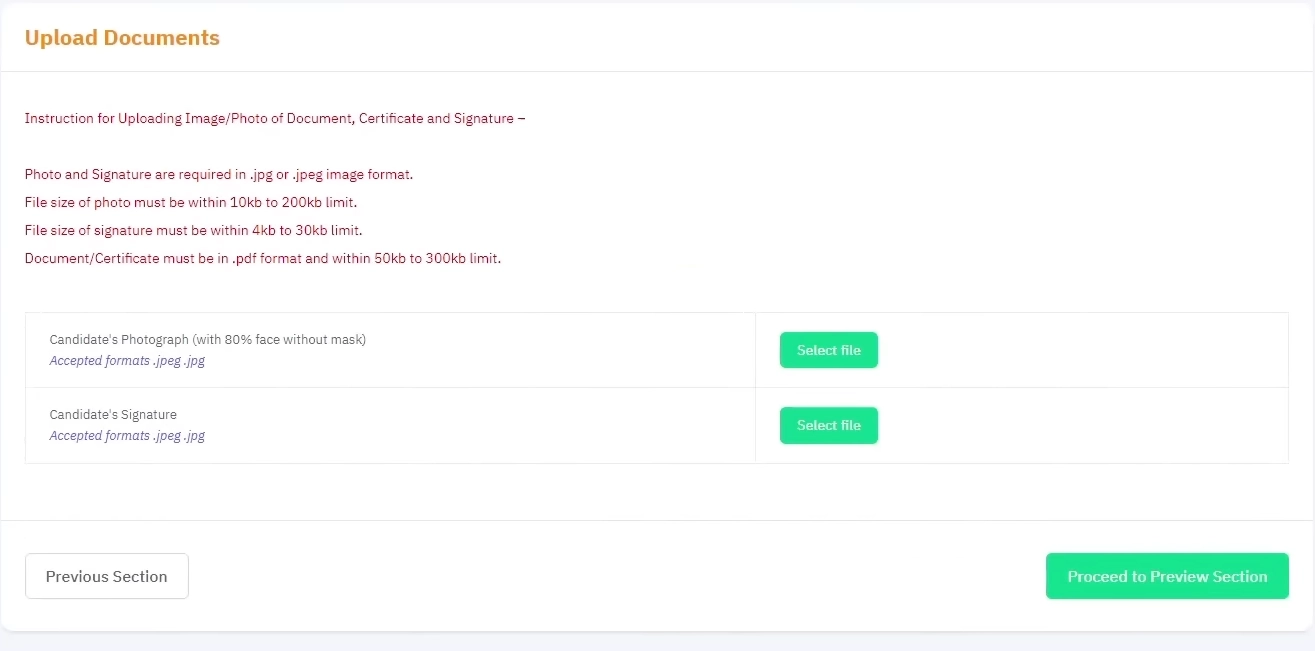
CUET (Common University Entrance Test) Admission Photo dimensions are 3.5cm width x 4.5cm height, filesize should be within 10-100KB and jpg or jpeg format.
| CUET (Common University Entrance Test) Admission Photo size, dimensions and format 2025 | |
| Photo dimensions | 3.5x4.5cm-200DPI |
| Photo Filesize | 10-200KB |
| Photo Format | JPG or JPEG |
CUET (Common University Entrance Test) Admission Signature dimensions are 3.5x1.5cm-200DPI, filesize should be within 10-50KB and jpg or jpeg format.
| CUET (Common University Entrance Test) Admission Signature size, dimensions and format 2025 | |
| Signature dimensions | 3.5x1.5cm-200DPI |
| Signature Filesize | 10-50KB |
| Signature Format | JPG or JPEG |
FAQ
Häufig gestellte Fragen
Kommentare (0)
Beschreiben Sie das aufgetretene Problem, damit wir es untersuchen und das Tool verbessern können.