
POST GDS 2026 Photo & Signature Resizer + Convert & Compress
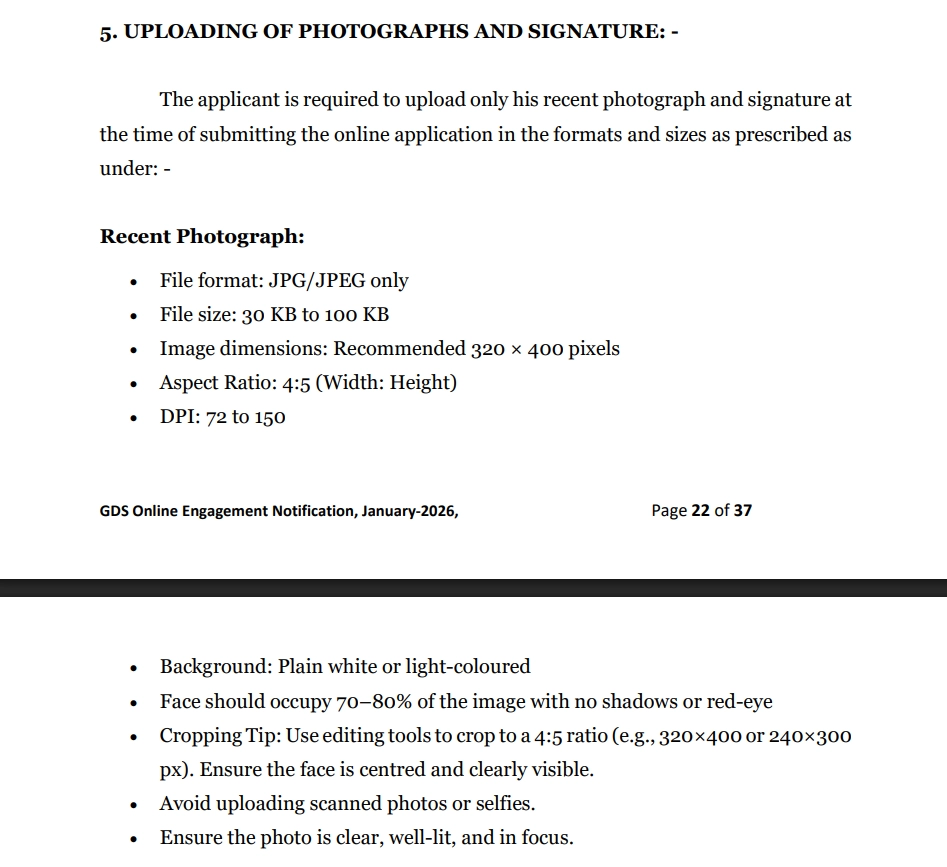
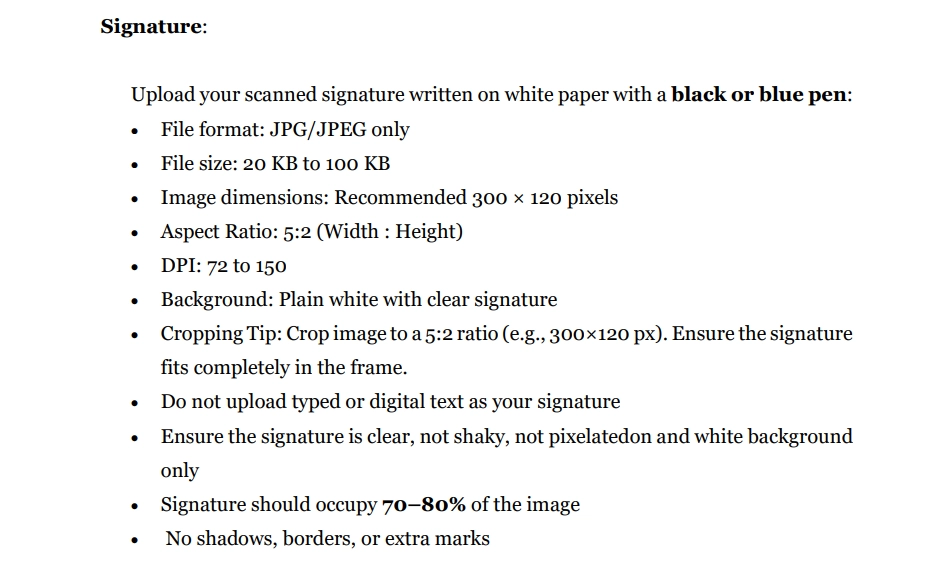
Using this free online India Post GDS Photo and Signature Resizer you can resize, crop, convert, and compress your photo and signature to the exact India Post GDS specification. Select India Post GDS, upload your image, and download a file at 320 x 400 px, in JPEG, under 100 KB.
Utilisation POST GDS 2026 Photo & Signature Resizer + Convert & Compress
Exam Photo & Document Tool
Drag & drop your image
JPG, PNG, WebP supported
Lire le contenu
What the India Post GDS recruitment is
The Department of Posts recruits Gramin Dak Sevak staff across the country, with engagement handled by India Post through its online recruitment portal. The roles cover Mail Guard, Mail Collector, Sorting Assistant, Delivery Assistant and the various categories of postman and multer, and the intake is large and spread across every circle and division of the postal network.
What sets GDS apart from a typical exam application is the documentation. Four separate document images are asked for, not one: the Class 10 certificate, a proof of date of birth, the Class 10 plus 2 marks memo or certificate, and the community certificate. Each is a 700 by 1024 pixel scan capped at 200 KB, and all four are validated separately from the photograph, so a correct portrait does not offset a missing or badly scaled certificate scan. The photograph itself is offered in several pixel sizes and in the physical 3.5 by 4.5 centimetre frame, with different ceilings attached to different options.
Start from indiapost.gov.in for the India Post GDS notice. Where a third-party page lists a different size from the one in the table above, the notice wins, and a correction published later can supersede both.
This page sets out the numbers India Post GDS actually asks for. It is not a general guide to cropping or to the tool interface, because those instructions do not change from one exam to the next and they are written up separately.
What the India Post GDS form asks you to upload
6 images go into this form. That is the detail most candidates miss, because the photograph and signature are the obvious ones and the remaining uploads are easy to overlook until the portal rejects the submission. They are:
- A photograph at 320 x 400 px, no heavier than 100 KB and no lighter than 30 KB.
- A signature at 300 x 120 px, no heavier than 100 KB and no lighter than 20 KB.
- A certificate scan at 700 x 1024 px, up to 200 KB.
- A date of birth proof at 700 x 1024 px, up to 200 KB.
- A marks memo or mark sheet scan at 700 x 1024 px, up to 200 KB.
- A community certificate at 700 x 1024 px, up to 200 KB.
| Item | Size | Unit | Format | Max file size | Min | DPI | Also published as |
|---|---|---|---|---|---|---|---|
| Photo | 320 x 400 | px | JPEG | 100 KB | 30 KB | 96 | |
| Photo | 240 x 300 | px | JPEG | 100 KB | 30 KB | 96 | |
| Photo | 200 x 230 | px | JPEG | 500 KB | 50 KB | 96 | |
| Photo | 200 x 230 | px | JPEG | 500 KB | 50 KB | 200 | |
| Photo | 3.5 x 4.5 | cm | JPEG | 500 KB | 50 KB | 200 | |
| Photo | 3.5 x 4.5 | cm | JPEG | 500 KB | 50 KB | 96 | |
| Signature | 300 x 120 | px | JPEG | 100 KB | 20 KB | 96 | |
| Signature | 140 x 60 | px | JPEG | 500 KB | 50 KB | 96 | |
| Signature | 140 x 60 | px | JPEG | 500 KB | 50 KB | 200 | |
| Signature | 3.5 x 1.5 | cm | JPEG | 500 KB | 50 KB | 200 | |
| Signature | 3.5 x 1.5 | cm | JPEG | 500 KB | 50 KB | 96 | |
| Document | 700 x 1024 | px | JPEG | 200 KB | 50 KB | 96 | India POST GDS 10th class certificate; India POST GDS Proof of DOB Certificate; India POST GDS 10+2 passed Marks Memo / Certificate; India POST GDS community Certificate |
The India Post GDS numbers, and why they matter
India Post GDS publishes its sizes in both units, which means the record is offering two ways to express the same kind of requirement. Pick the row that matches how your own advertisement is worded: centimetres when the notification states a physical frame, pixels when it states a resolution. They are alternatives published for different notifications, not a sequence to apply in turn.
Resolution appears more than once in the India Post GDS record, at 200 and 96 DPI. That is not a contradiction: the physical frame is the same in both, and the choice is how densely the image is stored. Where an advertisement is silent, the 200 DPI row is the safer one, because a denser image still measures correctly at a lower resolution while the reverse is not true.
India Post GDS sets a floor as well as a ceiling. The photograph has to land between 30 KB and 100 KB, and the signature between 20 KB and 100 KB. A file far below the minimum can fail the portal check even though it is technically under the limit, which is why the tool exposes a minimum field next to the maximum.
The India Post GDS record offers 6 photograph options and 5 signature options: 320 x 400 px; 240 x 300 px; 200 x 230 px; 3.5 x 4.5 cm. These come from different notifications and different recruitment streams rather than from one form, so there is no single right answer to which to use. Take the size from the advertisement you are actually applying under, and if it names a size that is not listed here, enter it by hand in the width and height fields.
There is a further upload on this form, covering a certificate. They sit alongside the photograph rather than replacing it, and each carries its own ceiling, so a file prepared for the portrait is the wrong starting point for them.
If the India Post GDS application refuses your file
- When India Post GDS refuses a file, weight is the first thing to check, because 100 KB leaves limited room. Look at the final size on the result card. If it sits above the limit, the source was cropped too loosely: tighten the frame and compress again.
- Check the signature separately from the photograph. A 300 x 120 px box with a wide margin around the writing will breach the 100 KB ceiling on its own, which is a different fix from anything that applies to the portrait.
- A third attempt with the same settings will produce the same result. Read the current notification again, because the specification is corrected by corrigendum from time to time and the values in this tool follow the specification as recorded.
Video tutorial from the original page
Official links from the original page
- app.indiapost.gov.in/gdscandidate
- indiapost.gov.in/gdsonlineengagement/pdf/descriptive-notification.pdf
- indiapost.gov.in/gdsonlineengagement
Images from the original page
Frequently Asked Questions
The mechanics of the crop step, the face mask overlay, and the compression trade-off are identical across all of these tools, so they have their own guide instead of a section on every page. See the complete photo and signature guide.
FAQ
Commentaires (2)
Thank you for your fantastic feedback! We're excited that you find the India Post GDS tool helpful. We're constantly working on improvements, so if you have any suggestions or features you'd like to see, feel free to let us know!
Décrivez le problème que vous avez rencontré afin que nous puissions l'examiner et améliorer l'outil.