
HPSC Photo and Signature Resizer, Converter and Compressor
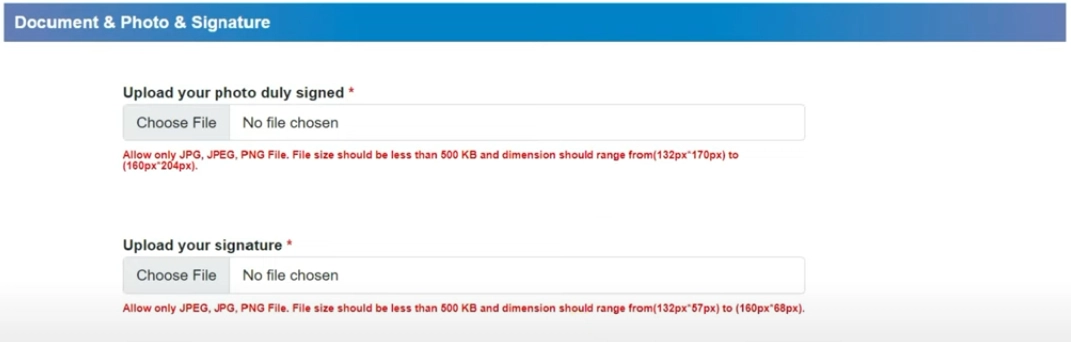
Using this free online HPSC Photo and Signature Resizer you can resize, crop, convert, and compress your photo and signature to the exact HPSC specification. Select HPSC, upload your image, and download a file at 132 x 170 px, in JPEG, under 500 KB.
ઉપયોગ કરો HPSC Photo and Signature Resizer, Converter and Compressor
Exam Photo & Document Tool
Drag & drop your image
JPG, PNG, WebP supported
સામગ્રી વાંચો
What the Himachal Pradesh Public Service Commission is
The Himachal Pradesh Public Service Commission, headquartered at Nigam Vihar in Shimla, runs the H.P. Administrative Service combined competitive examination and a large volume of direct recruitment for medical, legal, teaching and subordinate posts across the state.
The Himachal specification is quoted entirely in pixels, with no centimetre or DPI conversion involved. Two photo sizes are stored, 132 by 170 and 160 by 204 pixels, and the signature boxes are 132 by 57 and 160 by 68 pixels. The file weight allowance runs up to 500 KB but the lower bound is 10 KB rather than the 50 KB several other boards set, so there is considerably more room below than above on this one.
The HPSC notification itself is on hpsc.hp.gov.in. Check the upload section of that document before generating files, since these requirements are revised between recruitment drives and the values stored in this tool follow the recorded specification.
This page sets out the numbers HPSC actually asks for. It is not a general guide to cropping or to the tool interface, because those instructions do not change from one exam to the next and they are written up separately.
What the HPSC form asks you to upload
There are two separate uploads to prepare. They are:
- A photograph at 132 x 170 px, no heavier than 500 KB and no lighter than 10 KB.
- A signature at 132 x 57 px, no heavier than 500 KB and no lighter than 10 KB.
| Item | Size | Format | Max file size | Min | DPI |
|---|---|---|---|---|---|
| Photo | 132 x 170 | JPEG | 500 KB | 10 KB | 96 |
| Photo | 160 x 204 | JPEG | 500 KB | 10 KB | 96 |
| Signature | 132 x 57 | JPEG | 500 KB | 10 KB | 96 |
| Signature | 160 x 68 | JPEG | 500 KB | 10 KB | 96 |
The HPSC numbers, and why they matter
Unlike exams that quote centimetres, HPSC gives a pixel dimension. That makes the requirement exact rather than resolution dependent: 132 x 170 pixels is what the portal measures, and there is nothing to interpret.
HPSC works in both directions on file weight. The ceiling is 500 KB but the floor is only 10 KB, which is a much lower bound than several other boards set. That gives unusual room below: a heavily compressed file still clears the floor, so the practical pressure on this one is the upper limit rather than the lower.
If the HPSC application refuses your file
- A HPSC rejection usually comes down to one of two things. Either the file is over 500 KB because the crop left too much empty background, or the photo itself has a non plain background, a tilt, or a filter. Fix the weight first since it is measurable, then the photograph.
- For the HPSC signature, keep the crop tight around the ink. The 132 x 57 px frame is small, so every extra millimetre of empty paper is weight you do not have, and the 500 KB ceiling does not leave room for it.
- Repeating an identical submission is the most common wasted step here. Compare the values above against the live notification, and if the notification has moved, change one value at a time rather than re-running the whole form.
Images from the original page
Frequently Asked Questions
Cropping to a face, choosing a compression level, and the reasons a correctly sized photograph still gets refused do not vary by exam, so those are covered in one place rather than repeated here. Read the complete photo and signature guide.
વારંવાર પૂછાતા પ્રશ્નો
Suggested Tools





ટિપ્પણીઓ (0)
તમે સામનો કરેલી સમસ્યાનું વર્ણન કરો જેથી અમે તપાસ કરી શકીએ અને સાધનને સુધારી શકીએ.