
HPSC Photo and Signature Resizer, Converter and Compressor
HPSC Photo and Signature Resizer is an online tool that automatically adjusts your photo and signature as per Haryana Public Service Commission (HPSC) guidelines. Upload your image, and it will be resized, compressed, and formatted correctly without any manual effort.
compress photo within 10-100KB, signature within 10-50KB and convert photo and signature into jpg, jpeg and png format.
Image Height and Width Validator
Use :साधन
Exam Photo & Document Tool
Drag & drop your image
JPG, PNG, WebP supported
Read मजकूर
Table of Contents
[hide]
HPSC Photo and Signature Resizer
Ensure your photo and signature meet the exact requirements of the Haryana Public Service Commission (HPSC). Our tool automatically resizes, compresses, and formats your images to HPSC standards with ease.
HPSC Photo Resizer
Prepare your photo according to the HPSC photo requirements using our online tool. The dimensions for HPSC photos should range from 132px x 170px to 160px x 204px, with a maximum file size of 500 KB.
Our tool automatically resizes your photo to fit these exact specifications, ensuring your application complies with HPSC guidelines. Supported formats JPG, JPEG including PNG.
Upload your photo and let the tool handle the resizing and formatting for you. It’s quick, simple, and hassle-free, so your photo will be ready for submission in no time!
HPSC Signature Resizer
Resize your signature to fit the HPSC signature requirements effortlessly. The dimensions for HPSC signatures should range from 132px x 87px to 160px x 68px, with a maximum file size of 500 KB.
Supported formats for the signature are JPG, JPEG, PNG.
Upload your signature, and our tool will quickly resize it according to HPSC specifications, making the process easy and stress-free.
HPSC Photo & Signature Guidelines 2026
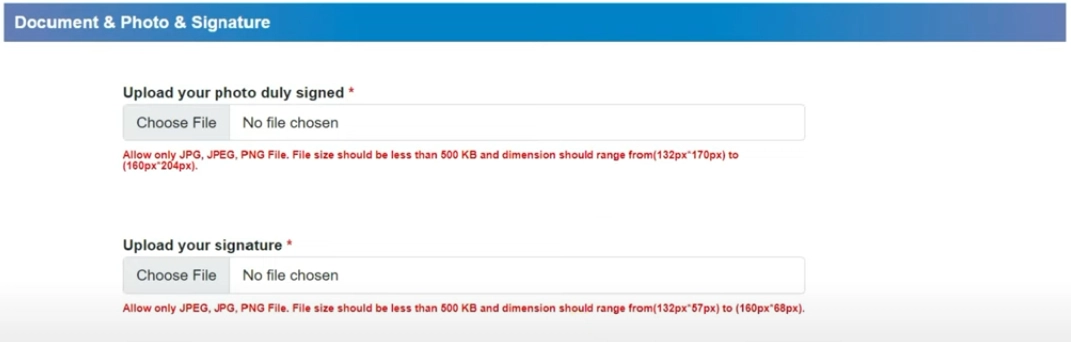
Photo Requirements:
- Dimensions: 132px x 170px to 160px x 204px
- File Size: Less than 500 KB
- Format: JPG, JPEG, PNG
Signature Requirements:
- Dimensions: 132px x 87px to 160px x 68px
- File Size: Less than 500 KB
- Format: JPG, JPEG, PNG
How to Resize HPSC Photo & Signature?
- Upload your photo and signature.
- The tool will automatically adjust dimensions and file size.
- Preview and download your correctly formatted files.
- Submit your images hassle-free to HPSC.
Everything is prefilled as per HPSC requirements – just upload and download!
FAQ
टिप्पण्वा (0)
Describe the issue you encountered so we can investigate and improve the साधन.