POST GDS 2026 Photo & Signature Resizer + Convert & Compress
The Newisty India Post GDS Photo, Signature, and Thumb Impression Resizer & Compressor helps you to resize, convert, and compress your files 100% accurately to meet the India Post GDS 2026 requirements. Use Newisty POST GDS tool for Photo and Signature Resizer tool and fix uploading issue.
ਵਰਤੋਂ POST GDS 2026 Photo & Signature Resizer + Convert & Compress
Exam Photo & Document Tool
Drag & drop your image
JPG, PNG, WebP supported
ਸਮੱਗਰੀ ਪੜ੍ਹੋ
Table of Contents
[hide]
India Post GDS Photo, Signature & Thumb Impression Resizer Tool
The India Post GDS Photo, Signature, and Thumb Impression Resizer & Compressor helps you resize, convert, and compress documents as per the official India Post GDS 2026 guidelines. The tool resizes photos to 320×400 pixels, signatures to 300×120 pixels, converts files to JPG/JPEG format, and compresses them within the prescribed file size limits.
India Post GDS Photo Guidelines
- Dimensions: 320×400 pixels (width × height), 72–150 DPI
- File size: 30 KB to 100 KB
- Format: JPG/JPEG only
- Aspect ratio: 4:5 ()
- Background: Plain white or light-coloured
- Face coverage: 70–80% of the image
- No shadows, red-eye, selfies, or scanned photos
- Image must be clear, well-lit, and in focus

India Post GDS Signature Guidelines
- Dimensions: 300×120 pixels, 72–150 DPI
- File size: 20 KB to 100 KB
- Format: JPG/JPEG only
- Aspect ratio: 5:2
- Signature must be handwritten on white paper
- Use black or blue ink only
- Signature should occupy 70–80% of the image
- No typed text, borders, shadows, or extra marks

How To Fix POST GDS 2026 Photo and Signature Upload Errors
If the India Post GDS application portal rejected your photo or signature, the exact error message it showed you is listed below with the fix. Every error comes down to one of three things: wrong aspect ratio, wrong file size in KB, or the wrong kind of image. Find your message, follow the steps, and re-upload.
Jump to your error message
Image must have 5:2 (landscape) aspect ratio (±10% tolerance)
Image must have 4:5 (portrait) aspect ratio (±10% tolerance)
Signature size should be at least 20KB
Signature size should be maximum 100KB
Photo size should be at least 30KB
Face detected in signature photo. Please upload only a signature, not a portrait.
Expected a rectangular signature shape (ratio between 1.5 and 4.5).
Upload signature (max size 100KB), file name max 10 chars
Upload your scanned signature written on white paper with a black or blue pen
Upload a recent passport size color photograph with the following specifications
Image must have 5:2 (landscape) aspect ratio (±10% tolerance)
Signature
Shown on the signature upload field
What it meansYour signature image is not wide enough for its height. India Post needs the width to be exactly 2.5 times the height — that is the 5:2 ratio. The recommended size is 300 × 120 pixels. The ±10% tolerance means a ratio between roughly 2.25 and 2.75 will pass; anything outside that is rejected.
आपके हस्ताक्षर की चौड़ाई और ऊँचाई का अनुपात 5:2 होना चाहिए — जैसे 300 × 120 पिक्सेल। यानी चौड़ाई, ऊँचाई से ढाई गुना होनी चाहिए।
Why it happenedAlmost always because the signature was photographed on a phone. A phone camera produces a 4:3 or 3:4 frame, so even a perfectly written signature sits inside a near-square image. The signature itself is fine — the surrounding white space is the wrong shape.
How to fix it- Upload your signature to the resizer above and choose the Signature preset.
- Drag the crop box so the signature fills the frame edge to edge. The 5:2 ratio is locked, so you cannot crop it to the wrong shape.
- Download the result. It comes out at
300 × 120 px, JPG, inside the 20–100 KB range.
Image must have 4:5 (portrait) aspect ratio (±10% tolerance)
Photograph
Shown on the photograph upload field
What it meansYour photograph is not tall enough for its width. India Post needs the height to be 1.25 times the width — the 4:5 portrait ratio. The recommended size is 320 × 400 pixels. A ratio between roughly 1.125 and 1.375 passes.
आपके फोटो की चौड़ाई और ऊँचाई का अनुपात 4:5 होना चाहिए — जैसे 320 × 400 पिक्सेल। यानी ऊँचाई, चौड़ाई से सवा गुना होनी चाहिए।
Why it happenedEither you uploaded a landscape or square photo, or you uploaded a scan of a printed passport-size photo that still had the white border around it. Studio passport photos are often 3.5 × 4.5 cm, which is a 7:9 ratio — close to 4:5 but outside the tolerance.
How to fix it- Upload the photo above and choose the Photo preset.
- Position the crop box so your face fills 70–80% of the frame and is centred. Trim off any white border from a scan.
- Download. You get
320 × 400 px, JPG, within 30–100 KB.
Signature size should be at least 20KB
Signature
Your file is too small, not too large
What it meansYour signature file is too small in kilobytes. India Post requires a minimum of 20 KB so the signature is legible when printed. This is the error people find most confusing, because every other government form asks you to make files smaller.
हस्ताक्षर की फाइल का आकार कम से कम 20 KB होना चाहिए। फाइल बहुत छोटी है, इसलिए उसे बड़ा करना है।
Why it happenedYou compressed it too hard — usually by running it through a generic "compress to 20 KB" tool, or by sending it over WhatsApp, which re-compresses images aggressively. A clean signature on white paper compresses extremely well, so it can easily land at 8–15 KB.
How to fix it- Start from the original signature file, not the WhatsApp copy. If the WhatsApp version is all you have, re-scan or re-photograph the signature.
- Upload it above with the Signature preset. The tool targets the middle of the legal range, not the minimum, so you are not sitting on the edge of a rejection.
- Confirm the output reads between 20 KB and 100 KB before you re-upload to the portal.
Signature size should be maximum 100KB
Signature
Your file exceeds the upload ceiling
What it meansThe opposite problem — your signature file is larger than the 100 KB ceiling.
हस्ताक्षर की फाइल 100 KB से बड़ी नहीं होनी चाहिए। फाइल को छोटा करना है।
Why it happenedYou uploaded the raw phone photo. A modern phone camera produces a 2–6 MB image, which is 20–60 times the limit. Resizing to 300 × 120 px fixes this automatically, because the pixel dimensions are what drive the file size.
- Upload the full-size original above with the Signature preset — do not pre-compress it yourself.
- Crop to the signature. Resizing to 300 × 120 px normally lands you inside the range on its own.
- Download and check the size is under 100 KB but still at least 20 KB.
Photo size should be at least 30KB
Photograph
The photo minimum differs from the signature minimum
What it meansYour photograph file is below the 30 KB minimum. The photo range is 30–100 KB — note that it differs from the signature range of 20–100 KB.
फोटो की फाइल कम से कम 30 KB होनी चाहिए। ध्यान दें — फोटो के लिए 30 KB और हस्ताक्षर के लिए 20 KB।
Why it happenedOver-compression, or you resized the photo far below 320 × 400 px before uploading. Very small pixel dimensions cannot produce a 30 KB file no matter what quality setting you use.
- Use the highest-resolution copy of the photo you have.
- Upload above with the Photo preset — it resizes to 320 × 400 px and targets a safe KB value in one pass.
- Verify the output is between 30 KB and 100 KB.
Face detected in signature photo. Please upload only a signature, not a portrait.
Signature
The portal ran face detection on your signature file
What it meansThe portal ran face detection on the file in the signature field and found a face. You have uploaded your photograph into the signature box, or the signature image has a face somewhere in it.
आपने हस्ताक्षर की जगह चेहरे वाली फोटो अपलोड कर दी है। हस्ताक्षर वाले बॉक्स में केवल हस्ताक्षर अपलोड करें।
Why it happenedUsually the two files were swapped, because both were sitting in your gallery with similar names. Occasionally it happens when the signature was photographed on a desk and a photo ID card, newspaper face or reflection was caught at the edge of the frame.
How to fix it- Open both files and confirm which is which. Rename them
photo.jpgandsign.jpgso you cannot mix them up again. - If a face genuinely appears at the edge of the signature image, upload it above with the Signature preset and crop tightly to the signature only.
- Re-upload each file into its correct field.
Expected a rectangular signature shape (ratio between 1.5 and 4.5).
Signature
A wider shape check than the strict 5:2 rule
What it meansA looser check than the strict 5:2 rule. The portal wants the image to be between 1.5 and 4.5 times wider than it is tall. Your image is either close to square (ratio under 1.5) or an extremely long thin strip (ratio over 4.5).
हस्ताक्षर की छवि आयताकार होनी चाहिए — चौड़ाई, ऊँचाई से 1.5 से 4.5 गुना के बीच। चौकोर या बहुत पतली पट्टी नहीं।
Why it happenedA ratio under 1.5 means you uploaded an uncropped phone photo. A ratio over 4.5 means you cropped too aggressively — trimming right to the ink and cutting off the vertical space above and below the signature.
How to fix it- Aim for exactly 2.5 (the 5:2 ratio), which sits comfortably in the middle of the accepted 1.5–4.5 band and also satisfies the stricter check.
- Upload above with the Signature preset — the locked ratio makes this impossible to get wrong.
- Leave a little white space above and below the ink rather than cropping flush to it.
Upload signature (max size 100KB), file name max 10 chars
Signature
Two separate rules in one message
What it meansTwo rules at once. The file must be under 100 KB, and the file name must be 10 characters or fewer including the .jpg extension. That leaves you just 6 characters for the name itself.
फाइल का नाम 10 अक्षर से कम रखें (.jpg सहित) और फाइल का आकार 100 KB से कम।
Why it happenedPhones and scanners generate long names — IMG_20260908_143022.jpg is 23 characters, and WhatsApp Image 2026-09-08 at 14.30.22.jpeg is far worse. Spaces and brackets in names cause the same rejection.
- Rename the file to
sign.jpg(8 characters) orphoto.jpg(9 characters). Both fit. - Use only lowercase letters — no spaces, brackets, hyphens or Hindi characters in the name.
- Confirm the extension is
.jpgor.jpeg. PNG and HEIC are rejected regardless of name length.
Upload your scanned signature written on white paper with a black or blue pen
Signature
The full instruction shown on the signature field
The full instruction, verbatimUpload your scanned signature written on white paper with a black or blue pen. File format: JPG/JPEG only. File size: 20 KB to 100 KB. Image dimensions: recommended 300 × 120 pixels. Aspect ratio: 5:2 (width : height). DPI: 72 to 150. Background: plain white with clear signature. Cropping tip: crop image to a 5:2 ratio (e.g. 300×120 px). Ensure the signature fits completely in the frame. Do not upload typed or digital text as your signature. Ensure the signature is clear, not shaky, and not pixelated.
— India Post GDS application portal
What it actually requiresSix separate conditions, and the portal checks all of them. The ones applicants miss most often are DPI between 72 and 150 and no typed or digital signature — a signature drawn with a mouse, typed in a cursive font, or generated by a signature-maker app is rejected even when the dimensions are perfect.
सफेद कागज़ पर काले या नीले पेन से किया हुआ हस्ताक्षर स्कैन करके अपलोड करें। टाइप किया हुआ या डिजिटल हस्ताक्षर स्वीकार नहीं होगा।
How to get all six right in one pass- Sign on plain white unlined paper with a black or blue pen. No pencil, no gel marker, no lined notebook page.
- Photograph or scan it in even daylight with no shadow across the paper. Hold the camera parallel to the page so the signature is not skewed.
- Upload above with the Signature preset. Format, dimensions, aspect ratio, DPI and KB range are all set for you.
- If the ink looks faint or grey, raise the contrast before downloading — "clear, not shaky, not pixelated" is a human check at verification, not only an automated one.
Upload a recent passport size color photograph with the following specifications
Photograph
The full instruction shown on the photograph field
The full instruction, verbatim
Upload a recent passport size color photograph with the following specifications. File format: JPG/JPEG only. File size: 30 KB to 100 KB. Image dimensions: recommended 320 × 400 pixels. Aspect ratio: 4:5 (width : height). DPI: 72 to 150. Background: plain white or light-coloured. Face should occupy 70–80% of the image with no shadows or red-eye. Cropping tip: use editing tools to crop to a 4:5 ratio (e.g. 320×400 or 240×300 px). Ensure the face is centred and clearly visible. Avoid uploading scanned photos or selfies. Ensure the photo is clear, well-lit, and in focus.
— India Post GDS application portal
What it actually requires
The two conditions that cause the most rejections at document verification are face occupying 70–80% of the frame and no selfies. A selfie taken at arm's length puts the face at roughly 40–50% of the frame, which fails the first condition even after you crop it to 4:5.
हाल की पासपोर्ट साइज़ रंगीन फोटो अपलोड करें। चेहरा फोटो का 70–80% होना चाहिए, पृष्ठभूमि सफेद या हल्के रंग की, और सेल्फी स्वीकार नहीं होगी।
How to get it right
- Use a studio passport photo if you have one, or have someone photograph you from about 1.5 metres against a plain white wall.
- Face the camera straight on in even light. No cap, no sunglasses, and no flash directly at the eyes — flash causes the red-eye the spec rules out.
- Upload above with the Photo preset and position the crop so your head and the top of your shoulders fill the frame.
- Check the face occupies roughly three-quarters of the final image before downloading.
A rejected upload does not end your application
Application and fee payment for the Schedule-II cycle run from 2 September to 21 September 2026 (up to 5:00 PM), with a correction window on 23–24 September 2026. Fix the file and re-upload before the deadline.
indiapost.gov.in's Official Statement Regarding POST GDS Photo and Signature
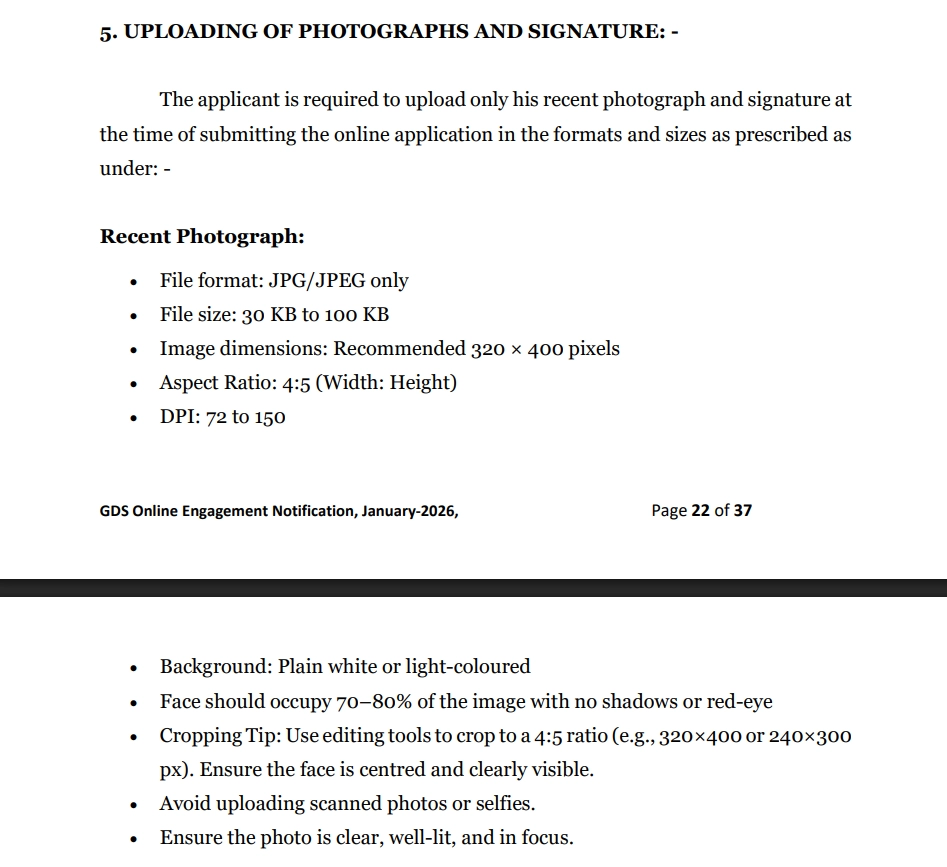
5. UPLOADING OF PHOTOGRAPHS AND SIGNATURE: -
The applicant is required to upload only his recent photograph and signature at the time of submitting the online application in the formats and sizes as prescribed as under: -
Recent Photograph:
- File format: JPG/JPEG only
- File size: 30 KB to 100 KB
- Image dimensions: Recommended 320 × 400 pixels
- Aspect Ratio: 4:5 (Width: Height) ()
- DPI: 72 to 150
- Background: Plain white or light-coloured
- Face should occupy 70–80% of the image with no shadows or red-eye
- Cropping Tip: Use editing tools to crop to a 4:5 ratio (e.g., 320×400 or 240×300px). Ensure the face is centred and clearly visible.
- Avoid uploading scanned photos or selfies.
- Ensure the photo is clear, well-lit, and in focus.
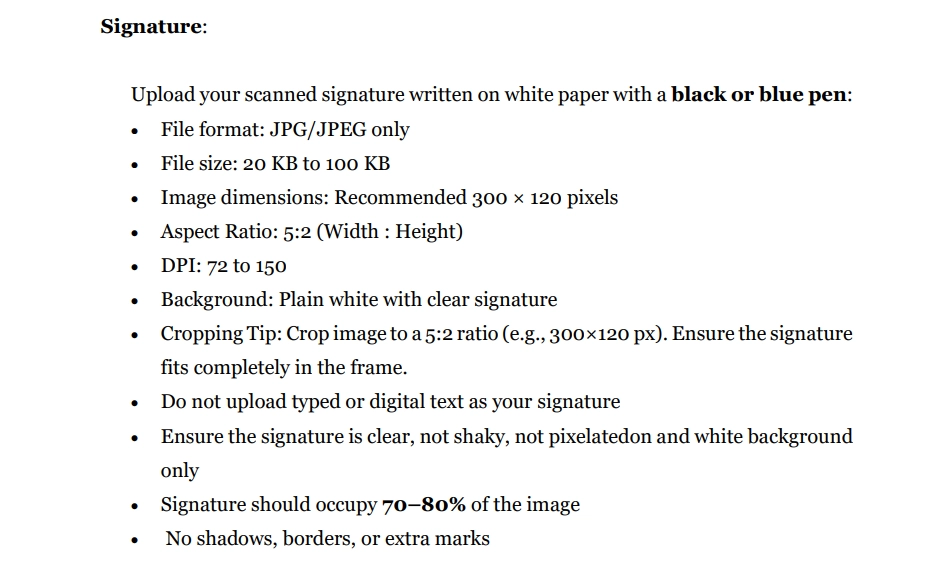
Signature:
Upload your scanned signature written on white paper with a black or blue pen:
- File format: JPG/JPEG only
- File size: 20 KB to 100 KB
- Image dimensions: Recommended 300 × 120 pixels
- Aspect Ratio: 5:2 (Width : Height)
- DPI: 72 to 150
- Background: Plain white with clear signature
- Cropping Tip: Crop image to a 5:2 ratio (e.g., 300×120 px). Ensure the signature fits completely in the frame.
- Do not upload typed or digital text as your signature
- Ensure the signature is clear, not shaky, not pixelatedon and white background only
- Signature should occupy 70–80% of the image
- No shadows, borders, or extra marks
Note : Applications with blurred photographs or with blurred/miniature signatures will be rejected.
10th Class Certificate
- Dimensions: 720×1024 pixels
- Maximum file size: 200 KB
- Format: JPG/JPEG
Proof of Date of Birth Certificate
- Dimensions: 720×1024 pixels
- Maximum file size: 200 KB
- Format: JPG/JPEG
10+2 Marks Memo / Certificate
- Dimensions: 720×1024 pixels
- Maximum file size: 200 KB
- Format: JPG/JPEG
Community Certificate
- Dimensions: 720×1024 pixels
- Maximum file size: 200 KB
- Format: JPG/JPEG
Important Dates: GDS Online Engagement Schedule-II (September 2026)
Mark your calendar! Missing deadlines means missing opportunities:
- User Registration: Aug 31 – Sep 19, 2026
- Application Submission: Sep 2 – Sep 21, 2026
- Edit/Correction Window: Sep 23 – Sep 24, 2026
- Vacancies: 23,757
- Fee: ₹100
Click here to register / apply
Notification No : 17-12/2026-GDS dated 20th, August ,2026
Video Tutorial: Resize India Post GDS Photo & Signature
Important Links
GDS Online Engagement Schedule-II January 2026 (PDF)
GDS Online Engagement Schedule-II July 2026 (Web)
India Post GDS Document FAQs
ਅਕਸਰ ਪੁੱਛੇ ਜਾਣ ਵਾਲੇ ਸਵਾਲ
ਟਿੱਪਣੀਆਂ (2)
Thank you for your fantastic feedback! We're excited that you find the India Post GDS tool helpful. We're constantly working on improvements, so if you have any suggestions or features you'd like to see, feel free to let us know!
ਤੁਸੀਂ ਜਿਸ ਸਮੱਸਿਆ ਦਾ ਸਾਹਮਣਾ ਕੀਤਾ, ਉਸਦਾ ਵੇਰਵਾ ਦਿਓ ਤਾਂ ਜੋ ਅਸੀਂ ਇਸਦੀ ਜਾਂਚ ਕਰਕੇ ਟੂਲ ਨੂੰ ਸੁਧਾਰ ਸਕੀਏ।