
SSC CHSL Photo and Signature Resizer, Converter and Compressor Online
SCC CHSL Photo and Signature Resizer will resize your photo in 3.5x4.5cm and signature in 4.0x2.0cm, Compressor will compress your photo between 20-50KB, and signature between 10-20KB in size, and converter will convert your photo and signature into jpg or jpeg format.
Also you can add date in your photo.
SSC CGL 2025 Photo and Signature Resizer, Compressor and Converter with Date
Image Height and Width Validator
Add Name and Date In Photo for SSC CHSL Exam's Online application
Utilização SSC CHSL Photo and Signature Resizer, Converter and Compressor Online
Exam Photo & Document Tool
Drag & drop your image
JPG, PNG, WebP supported
Ler o conteúdo
Table of Contents
[hide]
SCC CHSL Photo Resizer
SCC CHSL photo resizer is a tool where you can resize your SCC CHSL photo according to SCC CHSL photo guideline. It will resize your photo 120 pixels / 4.5 cm height x 100 pixels / 3.5 cm width, compress photo filesize 20-50KB and convert into JPEG format. You can add your name and date of photo in your photograph.
SCC CHSL Signature Resizer
SCC CHSL Signature resizer is a image resizing tool where you can resize your SCC CHSL Signature according to SCC CHSL Signature guideline. It will resize your Signature 60 pixels / 2.0 cm height x 140 pixels / 4.0 cm width, compress Signature filesize 10-20KB and convert into JPEG format.
SCC CHSL Photo and Signature Editor
To upload SCC CHSL photo and signature without any error, you need a photo editor to edit, add name date, resize, convert and compress your photo and signature for SCC CHSL. Newisty SCC CHSL SCC CHSL Photo and Signature Resizer, Converter, and Compressor with date tool will add name and date on your photo, and also resize, convert and compress your photo and signature for SCC CHSL according to SCC CHSL Photo and Signature guidelines.
SCC CHSL Photo and Signature Size 2023
| SCC CHSL Photo and Signature Size, Dimensions and format 2023 | |||
| SCC CHSL Document Name | File Size | SCC CHSL Document Dimensions size in cm | SCC CHSL Document Dimensions size in pixel |
| SCC CHSL Photo size Photo (3.5cm x 4.5cm) | 20KB–50KB | 3.5cm x 4.5cm | 120x100pixels |
| SCC CHSL Signature (4cm x 2cm) | 10KB–20KB | 4cm x 2cm | 140x60pixels |
Error in SCC CHSL Photo and Signature Uploading
Getting errors for photo or signature dimension or size in the SCC CHSL (The Staff Selection Commission conducts Combined Higher Secondary Level) online application form. Don't Worry. We will help you to solve this problem. We will convert, compress and resize your photo/image and signature according to the required format and size. Just Select Your Dream SCC CHSL exam's image type, we will set your targeted image 120 pixels / 4.5 cm height x 100 pixels / 3.5 cm width, filesize 20-50KB and signature 60 pixels / 2.0 cm height x 140 pixels / 4.0 cm width, filesize 10-20KB, Upload Your Image, Boooom!! Your Image is ready to upload without any error.
SCC CHSL Photo and Signature Dimensions, Size and format
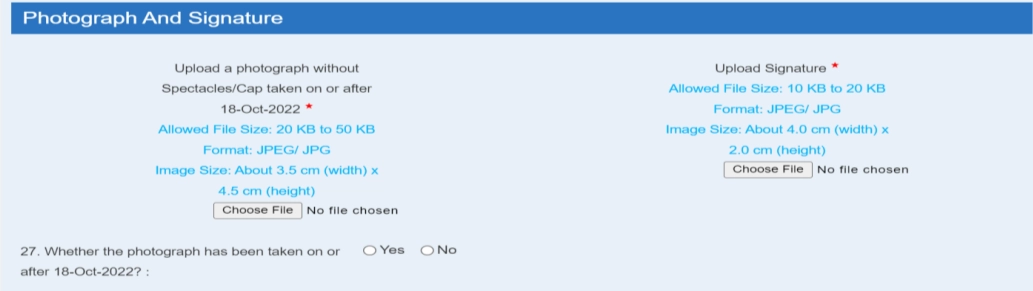
- SCC CHSL photo dimensions are 120 pixels / 4.5 cm height x 100 pixels / 3.5 cm width, filesize 20-50KB, jpeg / jpg format.
- SCC CHSL signature dimensions are 60 pixels / 2.0 cm height x 140 pixels / 4.0 cm width, filesize 10-20KB, jpeg / jpg format.
SCC CHSL Photo Size 2023 online
| SCC CHSL Photo Size, Dimensions and format 2023 | |||||
|---|---|---|---|---|---|
| SCC CHSL Document Name | File Size | Dimensions | File Type | File Extension | |
| SCC CHSL Photo size Photo (3.5cm x 4.5cm) | 20KB–50KB | 3.5cm x 4.5cm | 100x120pixels | JPG, or JPEG | *.jpg, or *.jpeg |
SCC CHSL Signature Size 2023 online
| SCC CHSL Signature Size, Dimensions and format 2023 | |||||
|---|---|---|---|---|---|
| SCC CHSL Document Name | File Size | Dimensions | File Type | File Extension | |
| SCC CHSL Signature (4cm x 2cm) | 10KB–20KB | 4cm x 2cm | 140x60pixels | JPG, or JPEG | *.jpg, or *.jpeg |
SSC CHSL 2023 Photo Size, Dimension and format
- SSC CHSL 2023 Photo size is 20 KB to 50 KB.
- SSC CHSL 2023 Photo dimensions are 3.5 cm (width) x 4.5 cm (height) or 100 (width) X 120 (height) in pixels
- SSC CHSL 2023 Photo should be in JPEG format
- SSC CHSL 2023 Photo background should be in White color.
- Name and Date at the bottom of the photo (Optional)
- The photograph must be taken on or after 17 June 2023
SSC CHSL 2023 Signature Size, Dimension and format
- SSC CHSL 2023 Photo size is 10 KB to 20 KB.
- SSC CHSL 2023 Photo dimensions are 4 cm (width) X 2 cm (Height) or 140 (width) X 12060(height) in pixels
- SSC CHSL 2023 Photo should be in JPEG format
- SSC CHSL 2023 Photo background should be in White color.
- The signature must be done by the candidate with a running hand
SCC CHSL photo and signature size converter and compressor
To upload the SCC CHSL photo and signature without any error or any problem you may need to convert the SCC CHSL photo and signature size to KB. To complete with SCC CHSL photo and signature with guidelines, your SCC CHSL photo size should be within 20-50 KB and your SCC CHSL signature size should be within 10-20 KB.
Newisty SCC CHSL Photo and Signature compressor will compress your SCC CHSL photo size within 20-50 KB and SCC CHSL signature with in 10-20 KB online for free.
Calculate Your Age for SSC CHSL 2023
Using Newisty Age Calculator you can calculate and validate your age for SSC CHSL 2023 application eligibility.
SCC CHSL Photo Sample
Acceptable Photograph

Samples of photographs which are not acceptable

SCC CHSL Related Frequently Asked Questions and Short Infomations
Perguntas frequentes
Comentários (0)
Descreva o problema que encontrou para que possamos investigar e melhorar a ferramenta.