
JAM Photo and Signature Resizer, Converter and Compressor
Getting ready for the IIT JAM exam? We’re here to help! At Newisty, we know how tricky it is to get your photo and signature sized just right for the exam. It’s stressful, isn’t it? But relax—we made a super-simple tool that fixes your files in seconds, so you can focus on acing the exam.
Your photo and signature need to look clean and meet the rules. With Newisty’s tool, you’ll resize, adjust, and submit them perfectly—no stress, no guesswork. Just click, fix, and go!
Использование JAM Photo and Signature Resizer, Converter and Compressor
Exam Photo & Document Tool
Drag & drop your image
JPG, PNG, WebP supported
Прочитать текст
JAM Photo and Signature Resizer, Converter and Compressor
The Joint Admission Test for Masters (JAM) is the national exam for admission to M.Sc., joint M.Sc.-Ph.D. and similar postgraduate programmes at the IITs, IISc and many other institutes. JAM 2027 is organised by IIT Kharagpur, and the whole application runs online through the JAM Online Application Processing System (JOAPS). Before you can submit the form, you must upload a photograph and a signature that follow strict rules for size, pixels, file weight and format.
Most phone photos are several megabytes in size and thousands of pixels wide, so JOAPS will not accept them. This free tool fixes that. It resizes, crops, converts and compresses your photo and signature to the official JAM 2027 specification in your browser, so you can download a ready-to-upload JPG in under a minute.
JAM 2027 Key Dates (Tentative)
These dates come from the official JAM 2027 notifications page published by IIT Kharagpur. They are tentative and can change, so always check the official JAM website before acting on them.
- 31 August 2026: JAM 2027 Information Brochure released.
- 12 September 2026: JOAPS website opens for online registration and application.
- 19 October 2026: Last date to register and submit the application.
- 10 November 2026 (tentative): JOAPS opens for corrections to application data, on a payment basis.
Note for PwD candidates: the notification says the required forms (for example, for compensatory time or a scribe) must be uploaded after you pay the application fee. Keep those documents ready along with your photo and signature.
JAM 2027 Photograph Requirements
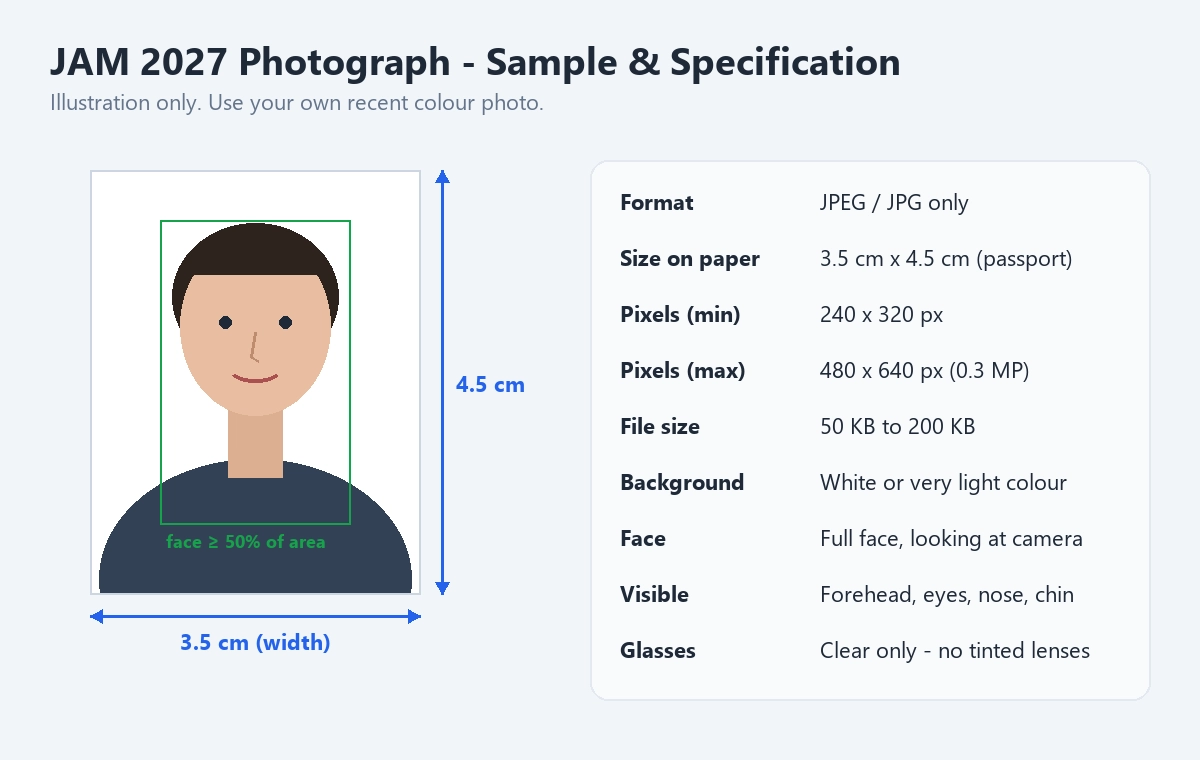
The photograph is printed on your admit card and your scorecard, and it is used to identify you at the exam centre. That is why IIT Kharagpur has clear rules for it. Here is the official JAM 2027 photo specification in simple words:
- File format: JPEG / JPG only.
- Physical size: 3.5 cm wide x 4.5 cm high (passport size).
- Pixel size: minimum 240 x 320 pixels, maximum 480 x 640 pixels (0.3 megapixel).
- File size: between 50 KB and 200 KB.
- Colour: a recent colour photograph.
- Background: white or a very light colour.
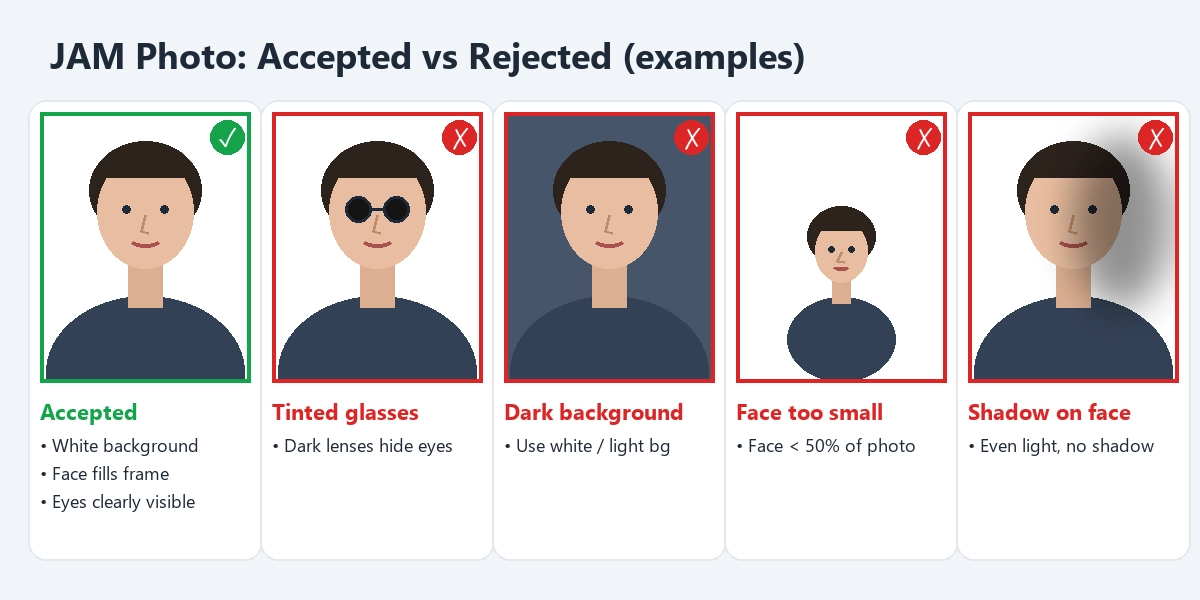
- Face: full face, looking straight at the camera, covering at least 50% of the photo area.
- Visibility: forehead, eyes, nose and chin must be clearly visible. Hair, clothes, a face mask or shadows must not hide your face.
- Spectacles: clear glasses only. Dark or tinted lenses are not allowed. If glasses cause glare, take the photo without them.
- Appearance: the photo should match how you will look on exam day.
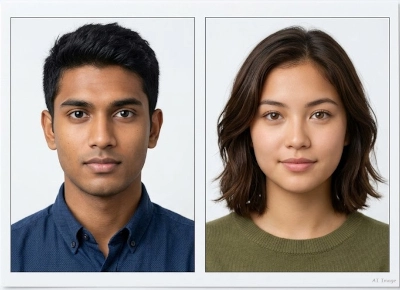
Official Sample: Accepted Photographs
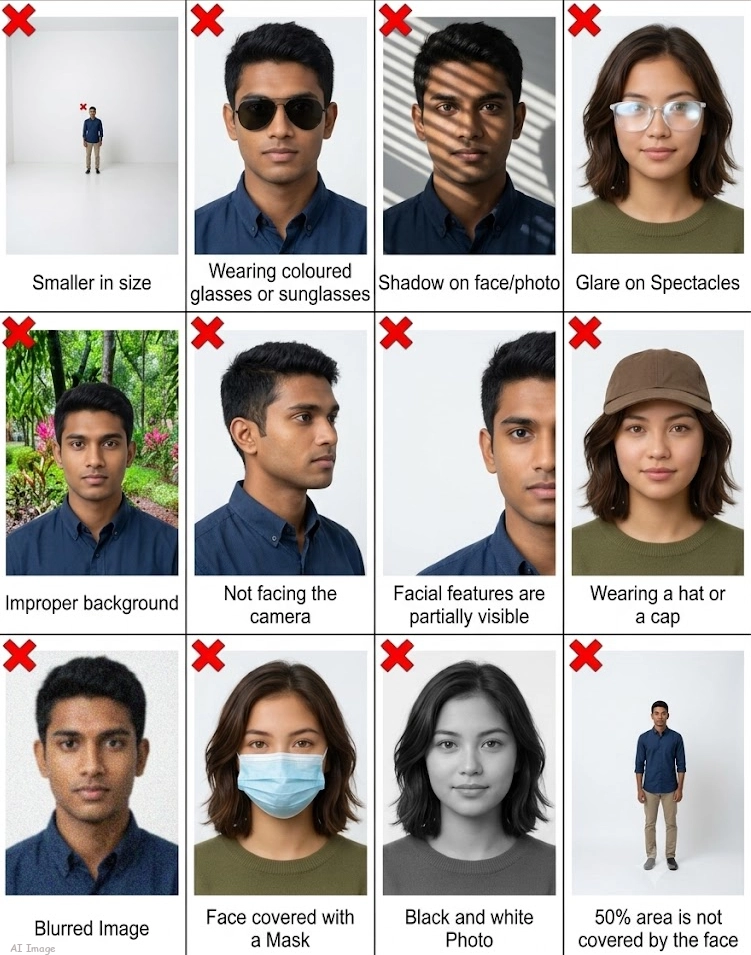
The official brochure also warns that low-resolution phone photos and self-composed portraits (such as selfies) can lead to rejection, and that the application fee is not refunded for rejected applications. A plain, well-lit photo taken by someone else against a white wall is the safest choice.
Official Sample: Photographs That Are Not Accepted
JAM 2027 Signature Requirements
The signature has its own rules. JAM asks you to sign inside a drawn box rather than on a random piece of paper, so the shape of the final image is fixed.
- Box: draw a rectangle 7 cm wide and 2 cm high on white paper.
- How to sign: sign horizontally and keep the whole signature inside the box.
- Ink: black or dark blue only.
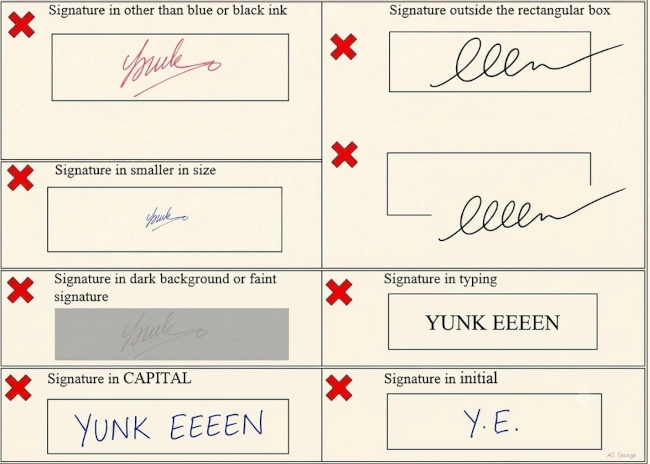
- Not accepted: signatures in all capital letters, initials only, or ink of any other colour.
- Scanning: scan the paper (a proper scanner is recommended) and crop the image to the border of the box.
- File format: JPEG / JPG only.
- Pixel size: minimum 280 x 80 pixels, maximum 560 x 160 pixels.
- File size: between 50 KB and 150 KB.
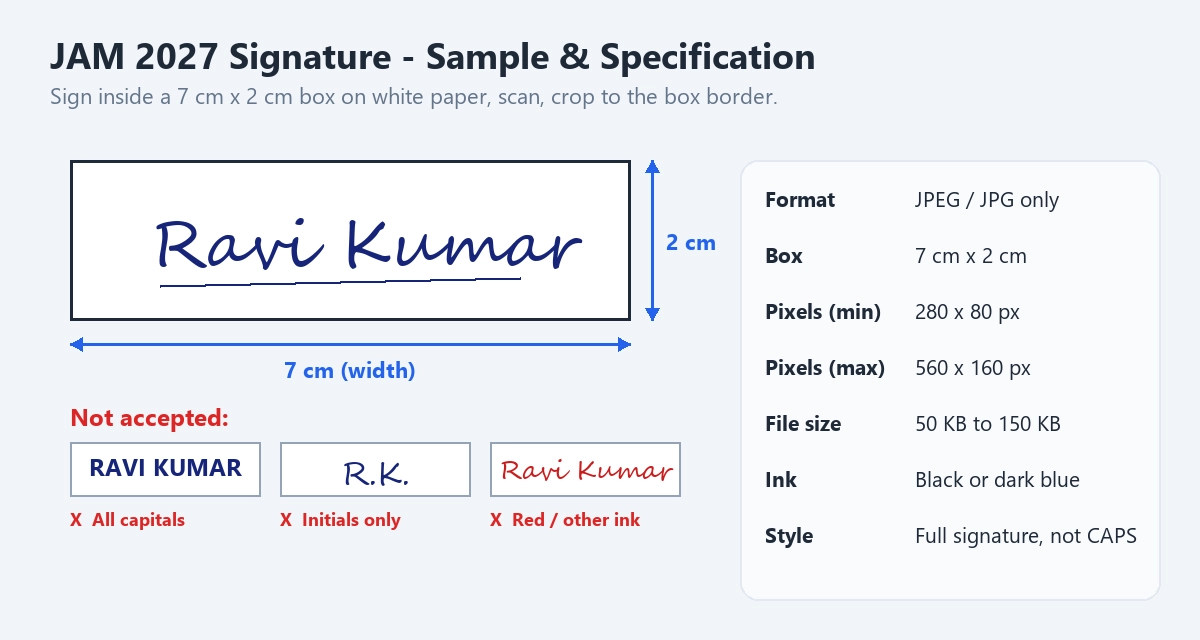
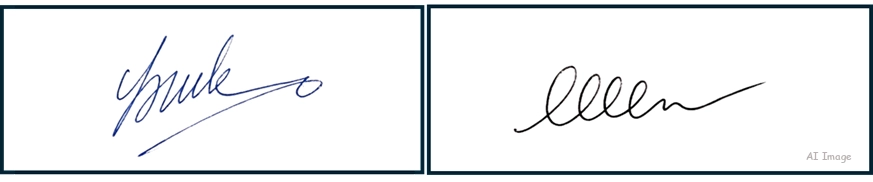
Official Sample: Accepted Signatures
Official Sample: Signatures That Are Not Accepted
Other Documents for the JAM 2027 Application
Along with the photo and signature, keep these documents ready before you start the form:
- Class 10 (SSC) mark sheet or certificate, used as proof of your name and date of birth.
- Category certificate if you apply as OBC-NCL, EWS, SC or ST. It must be issued by an authorised official. OBC-NCL and EWS certificates must be in the prescribed format and issued on or after 1 April 2026.
- PwD certificate and UDID card or number if you apply as a person with disability, plus the separate form if you need compensatory time and/or a scribe.
The official page does not list a file size limit for these documents, so follow the limits shown inside JOAPS when you upload them.
What This Tool Can Do
- One-click JAM presets. Pick the JAM photo or signature format and the tool loads the correct pixel size, file size range and JPG format.
- Resize to exact pixels. Choose the maximum size (480 x 640 photo, 560 x 160 signature) for the sharpest result, or the minimum size if you need a lighter file.
- Centimetre presets. Prefer to work in centimetres? The 3.5 x 4.5 cm photo and 7 x 2 cm signature presets are converted to pixels at 200 DPI, which falls inside the JAM pixel range.
- Compress to the right weight. The tool adjusts JPEG quality so the file lands between 50 KB and 200 KB for the photo, or 50 KB and 150 KB for the signature.
- Convert any format. PNG, WebP and other common images are turned into a proper JPG.
- Crop and zoom. Move and zoom the image so your face fills the frame, or so the signature box border sits right at the edge.
- Check before download. The result is compared with the JAM limits so you can see at a glance whether it will be accepted.
- Private. Images are processed in your browser. You do not need an account.
How to Use the JAM Photo and Signature Resizer
- Take a good source image. For the photo, stand in front of a white wall in even daylight and ask someone else to take the picture. For the signature, draw a 7 cm x 2 cm box on white paper, sign inside it in black or dark blue ink, and scan it.
- Open the tool and choose the JAM format. Select "JAM" and then the photo or signature type.
- Upload your image. Drag and drop it or tap to choose a file from your phone or computer.
- Crop. For the photo, keep your full face centred and large (at least half the frame). For the signature, crop exactly to the box border.
- Process and check. The tool resizes and compresses the image, then shows the final pixel size and file size.
- Download and upload to JOAPS. Save the JPG and upload it in the photo or signature section of your JAM application.
Do's and Don'ts
Do
- Use a recent colour photo with a white or very light background.
- Look straight at the camera with your whole face visible.
- Use soft, even light so there are no shadows on your face.
- Sign your full signature in black or dark blue ink inside the 7 x 2 cm box.
- Check the final file size and pixel size before uploading.
Don't
- Don't upload a selfie, a group photo crop or a blurry low-light picture.
- Don't wear tinted glasses, caps or a face mask.
- Don't sign in capital letters, use only initials, or use red, green or pencil.
- Don't stretch the image to fit; crop it so the proportions stay natural.
- Don't wait until the last day (19 October 2026). The portal gets slow near the deadline.
Limitations
This tool changes the size, format and file weight of your image. It cannot fix a photo that breaks the content rules. If your background is dark, your face is in shadow or you are wearing tinted glasses, take a new photo. The tool also does not upload anything to JOAPS for you, and it is not affiliated with IIT Kharagpur or the JAM organising committee. Requirements can change between notifications, so compare the values above with the latest official JAM 2027 brochure before you submit.
Frequently Asked Questions
Часто задаваемые вопросы
Комментарии (0)
Опишите возникшую проблему, чтобы мы могли её изучить и усовершенствовать инструмент.