
Bihar PSC (BPSC) Photo and Signature Resizer, Compressor and Converter
✅ Bihar PSC (BPSC) Photo & Signature Tool - Get It Right First Time
Upload your regular photo and signature, and our tool instantly resizes them to BPSC's exact requirements (250×250px photo, 220×100px signature), compresses to 25KB/15KB limits, and converts to JPG format. No more rejections. Works perfectly on mobile and other devices.
Bangladesh Public Service Commission (BPSC) Photo resizerபயன்படுத்து Bihar PSC (BPSC) Photo and Signature Resizer, Compressor and Converter
Exam Photo & Document Tool
Drag & drop your image
JPG, PNG, WebP supported
உள்ளடக்கத்தைப் படிக்கவும்
Bihar PSC (BPSC) Photo and Signature Resizer, Compressor and Converter
The Bihar Public Service Commission (BPSC) conducts the Integrated Combined Competitive Examination (CCE), the Teacher Recruitment Examination (TRE) and many other state recruitments. Applications are filled online, and BPSC is strict about your photograph and signatures: it asks for a signature in both English and Hindi, with very small file limits.
This free tool resizes, crops and compresses your BPSC photo and signatures in your browser and checks them against the BPSC limits before you download.
Important: 72nd CCE Uses a Live Webcam Photo
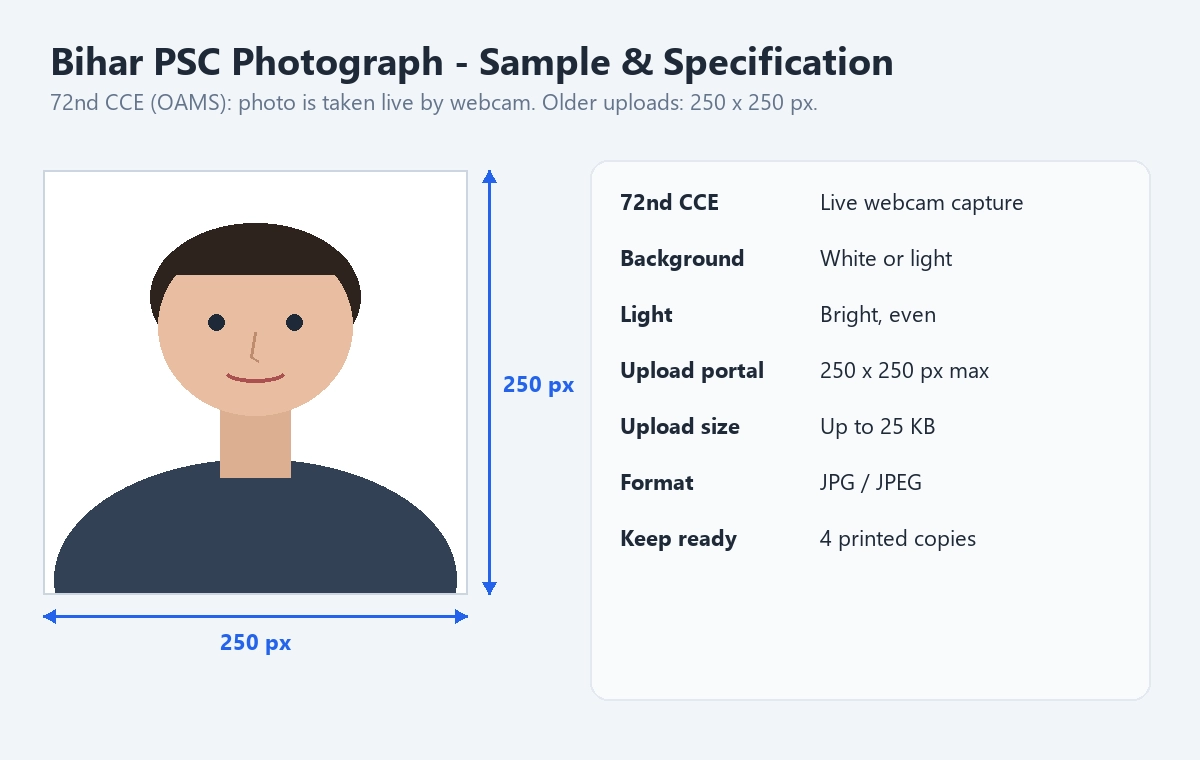
For the 72nd Integrated Combined Competitive Examination, the official advertisement says your photograph is captured live by webcam during the online application (profile Step 6), not uploaded as a file. To get it right:
- Use a device with a good-quality webcam.
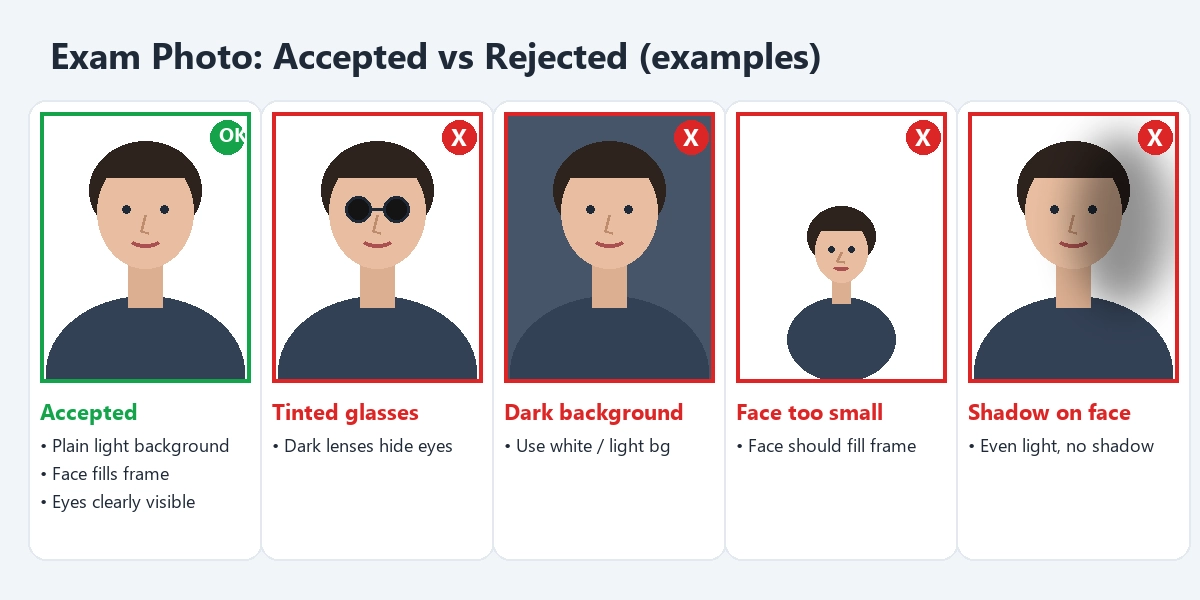
- Sit in front of a white or light-coloured background with enough light on your face.
- Make sure the photo is clear before you confirm it.
- Keep four printed copies of a recent photograph; the Commission may ask for them later.
For BPSC exams that still ask you to upload a photo, the BPSC portal note limits the photo to 250 x 250 pixels and 25 KB in JPG format. This tool includes that size.
BPSC Signature Requirements (English and Hindi)
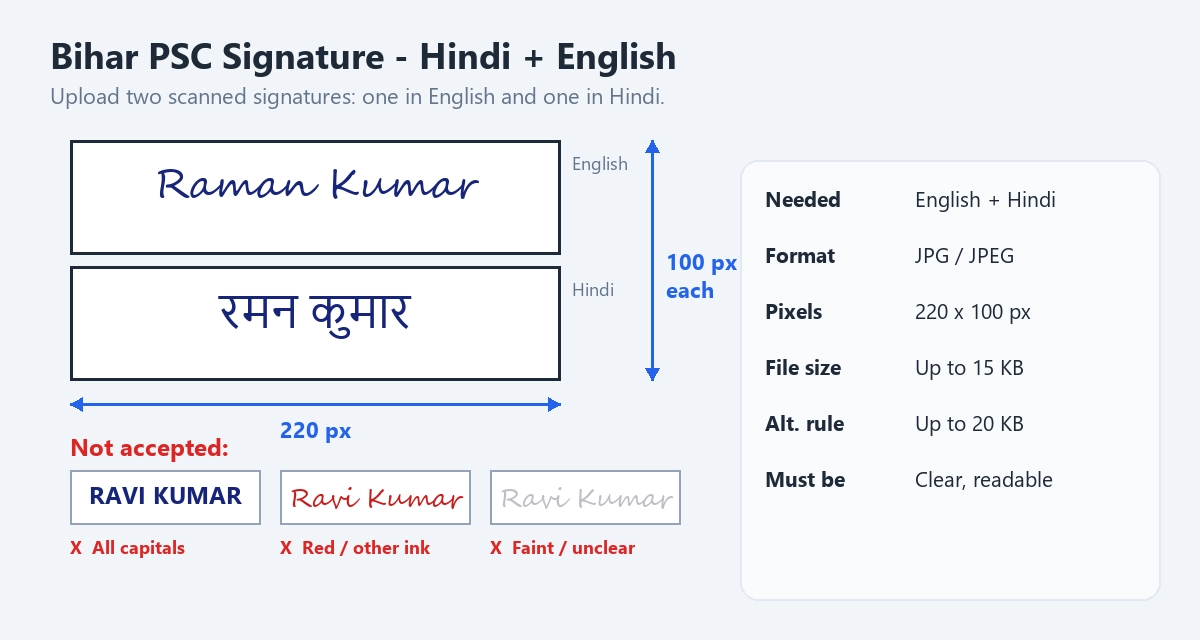
BPSC needs two separate scanned signatures: one in English and one in Hindi. Both must be clear and readable. The 72nd CCE advertisement gives these limits:
- Format: JPG / JPEG.
- Dimensions: 220 x 100 pixels.
- File size: up to 15 KB each.
The same advertisement also mentions a limit of up to 20 KB in another section. A signature that is 220 pixels wide and under 15 KB meets the stricter rule, which is why this tool's official BPSC signature options use 220 x 100 pixels and 15 KB.
How the BPSC Upload Screen Looks
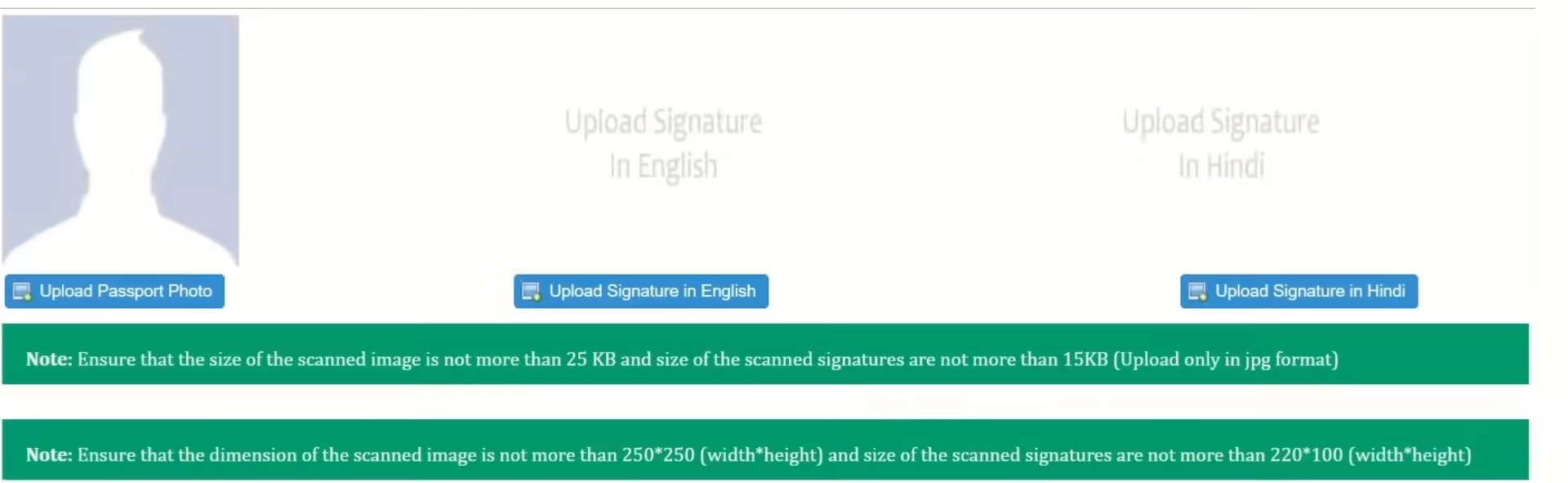
On the upload page you will see three boxes: your photo, your signature in English and your signature in Hindi. The note under the boxes shows the size limits.
Other Documents for BPSC
For the 72nd CCE, all certificates and documents are uploaded as scanned PDF files of up to 100 KB each. Many documents can also be linked through DigiLocker during One Time Registration.
BPSC 2026: Key Dates
- 72nd CCE: online applications ran from 7 May to 31 May 2026 (official advertisement). The preliminary exam was rescheduled; the revised calendar reportedly lists 25 October 2026 (tentative).
- TRE 4.0 (Advertisement 15/2026, 32,388 posts): applications are reported to run from 25 September to 26 October 2026, with fees due by 25 October 2026.
Dates marked as reported come from news coverage and can change. Always confirm them on the official website (bpsc.bihar.gov.in).
What This Tool Can Do
- Official BPSC presets. English and Hindi signature options at 220 x 100 px, up to 15 KB, plus the 250 x 250 px, 25 KB photo.
- Tight compression. Gets your files under the small 15 KB and 25 KB limits while keeping them readable.
- Format conversion. PNG, WebP and other images become JPG.
- Crop and adjust. Move, zoom and rotate; crop each signature close to the ink.
- Check before download. A comparison table shows your file against the BPSC limits.
- Private and free. Everything runs in your browser.
How to Resize Your BPSC Signatures and Photo
- Sign once in English and once in Hindi on white paper with a dark pen, and scan both.
- Open this tool and choose Signature, then the official English option.
- Upload the English signature, crop it close to the ink, click Apply crop and download it.
- Start over, choose the official Hindi option and repeat with your Hindi signature.
- If your exam asks you to upload a photo, choose Photo and the official 250 x 250 px option.
Tips for a Clean Photo and Signature Scan
- Light: stand facing a window or a bright lamp so there are no shadows on your face or on the paper.
- Background: a plain white or light wall works best for the photo; plain white paper works best for the signature.
- Camera: hold the phone straight, not at an angle, and tap the screen to focus before taking the picture.
- Signature pen: use a dark gel or ball pen so thin strokes still show after compression.
- Crop tight: leave only a small margin around the signature so the ink fills the frame and stays readable at small pixel sizes.
- Keep the original: save your original photo and signature, so you can make a new copy if a future advertisement asks for a different size.
Do's and Don'ts
Do
- Prepare both English and Hindi signatures before you start the form.
- Use bright, even light and a light background for the webcam photo.
- Check the KB size shown by the tool; the limits are very small.
Don't
- Don't upload the same signature twice for English and Hindi.
- Don't use faint, unclear or capital-letter signatures.
- Don't take the webcam photo in a dark room or against a busy background.
Limitations
This tool resizes and compresses images; it cannot take your live webcam photo for the 72nd CCE, which happens inside the BPSC portal. It does not upload anything to BPSC for you. Newisty is not affiliated with the Bihar Public Service Commission. The official advertisement is not fully consistent on the signature size, so always check the advertisement for your exam.
Frequently Asked Questions
அடிக்கடி கேட்கப்படும் கேள்விகள்
கருத்துகள் (0)
நீங்கள் சந்தித்த சிக்கலை விவரிக்கவும், அப்போதுதான் நாங்கள் அதை ஆராய்ந்து கருவியை மேம்படுத்த முடியும்.