
TNeGA Photo Compressor (TNe-sevai), Converter and Resizer
Stop TNeGA application rejections! Thousands of Tamil Nadu citizens face delays in e-Sevai services due to improper photo and document formats. Our free tool ensures your documents meet TNeGA's strict requirements for 2026 applications.
Simply upload your photo or document, and our tool instantly resizes, compresses, and converts your files to meet official TNeGA specifications:
- Photos: Under 50KB • Multiple dimensions supported
- Documents: PDF conversion available
- Supported formats: JPG, JPEG, GIF, PNG
Drag and drop your image now - get perfectly formatted files in seconds!
Convert Your TNeGA Image documents to PDFใช้ TNeGA Photo Compressor (TNe-sevai), Converter and Resizer
Exam Photo & Document Tool
Drag & drop your image
JPG, PNG, WebP supported
อ่านเนื้อหา
Table of Contents
[hide]
TNeGA Photo Compressor, Converter and Resizer Tool
TNeGA Photo Compressor, Converter and Resizer is a photo editing tool, where you can compress your TNeGA photo within 50KB, convert your photo to jpg, jpeg, gif, png format according to TNeGA Photo guidelines. Also you can convert and compress your TNeGA Documents also. This tool will help you to upload your TNeGA photo and documents without any error. It will process all of your TNeGA documents according to TNeGA instructions.
TNeGA Photo and Document size, dimensions and format
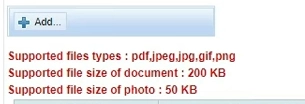
- TNeGA Photo Dimensions are 3.5x4.5cm, 200 DPI, maximum filesize 50KB and, image should be in JPG ,JPEG, PNG or GIF format
- TNeGA Document should be in PDF format and within 200KB size.
Essential TNeGA Photo & Document Checklist
Before submitting your TNeGA application through e-Sevai centers or online portals, verify these critical details:
For Photos:
- ✓ File size under 50KB (critical for TNeGA portal acceptance)
- ✓ Clear facial features with proper lighting
- ✓ Recent photo (taken within last 6 months)
- ✓ Plain background without patterns
- ✓ No watermarks or additional text
For Documents:
- ✓ Scanned copies must be clear and legible
- ✓ File size optimized for TNeGA portal upload
- ✓ Proper orientation (no rotated documents)
- ✓ All four corners visible in scanned copies
- ✓ Sensitive information appropriately redacted if needed
Common TNeGA Photo Rejection Reasons
คำถามที่พบบ่อย
ความคิดเห็น (3)
Good
โปรดอธิบายปัญหาที่คุณพบ เพื่อให้เราสามารถตรวจสอบและปรับปรุงเครื่องมือได้