
Exam Photo Tools Công cụ đã được cập nhật 2 ngày trước

TNeGA Photo Compressor (TNe-sevai), Converter and Resizer

Stop TNeGA application rejections! Thousands of Tamil Nadu citizens face delays in e-Sevai services due to improper photo and document formats. Our free tool ensures your documents meet TNeGA's strict requirements for 2026 applications.

Simply upload your photo or document, and our tool instantly resizes, compresses, and converts your files to meet official TNeGA specifications:

  • Photos: Under 50KBMultiple dimensions supported
  • Documents: PDF conversion available
  • Supported formats: JPG, JPEG, GIF, PNG

Drag and drop your image now - get perfectly formatted files in seconds!

Convert Your TNeGA Image documents to PDF

TNeGA Photo Photo Compressor Convert Image TNe-sevai Ready

Sử dụng TNeGA Photo Compressor (TNe-sevai), Converter and Resizer

Select your exam
What are you submitting?
Upload your image

Drag & drop your image

JPG, PNG, WebP supported

Browse file
Crop & adjust Optional
Adjust your image — or skip to use it as-is
Recommended for exam photo alignment
Keep the face centered inside the oval guide. For passport or exam-style photos, try to let the face fill roughly 70% of the crop height.
Mode
Zoom
Rotate
Flip
W: — H: —
Add name & date caption Optional Required by exam
Text is placed below the image — not printed on it
As it should appear on the form
Date of birth or exam date
Preview — name & date strip appears below the image
Processing your image…
Resizing to exam specifications
Liên kết công cụ
Đã sao chép vào khay nhớ tạm.
Hãy giúp cải thiện công cụ này
54.50K
Thời gian sử dụng
44.41K
Tổng số người dùng
3+ năm
Đã phục vụ
Được rà soát lần cuối vào 2 ngày trước. Số liệu sử dụng được cập nhật trong các đợt kiểm toán định kỳ. (Bắt đầu báo cáo từ 21 Feb 2022)
Báo cáo sự không khớp

Đọc nội dung

Tìm hiểu cách thức hoạt động của công cụ này và khi nào nên sử dụng nó.

TNeGA Photo Compressor, Converter and Resizer Tool

TNeGA Photo Compressor, Converter and Resizer is a photo editing tool, where you can compress your TNeGA photo within 50KB, convert your photo to jpg, jpeg, gif,  png format according to TNeGA Photo guidelines. Also you can convert and compress your TNeGA Documents also. This tool will help you to upload your TNeGA photo and documents without any error. It will process all of your TNeGA documents according to TNeGA instructions.

TNeGA Photo and Document size, dimensions and format
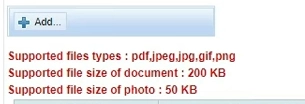
TNeGA Photo and Document size, dimensions and format

  • TNeGA Photo Dimensions are 3.5x4.5cm, 200 DPI, maximum filesize 50KB and, image should be in JPG ,JPEG, PNG or GIF format
  • TNeGA Document should be in PDF format and within 200KB size.

Essential TNeGA Photo & Document Checklist

Before submitting your TNeGA application through e-Sevai centers or online portals, verify these critical details:

For Photos:

  • ✓ File size under 50KB (critical for TNeGA portal acceptance)
  • ✓ Clear facial features with proper lighting
  • ✓ Recent photo (taken within last 6 months)
  • ✓ Plain background without patterns
  • ✓ No watermarks or additional text

For Documents:

  • ✓ Scanned copies must be clear and legible
  • ✓ File size optimized for TNeGA portal upload
  • ✓ Proper orientation (no rotated documents)
  • ✓ All four corners visible in scanned copies
  • ✓ Sensitive information appropriately redacted if needed

Common TNeGA Photo Rejection Reasons

Câu hỏi thường gặp

Các câu trả lời ngắn gọn cho những thắc mắc mà người dùng thường đặt ra trước khi tin tưởng vào kết quả.

Many applicants miss these hidden requirements: 1) Background has subtle patterns that trigger AI rejection, 2) File metadata contains location data that TNeGA systems flag, 3) Border pixels around the image exceed specifications, 4) Color profile mismatch (RGB vs CMYK). Our tool automatically corrects all these issues while maintaining quality.

TNeGA doesn't specify exact pixel dimensions but requires appropriate aspect ratios based on document type. Our tool analyzes your photo's intended use and applies the correct proportions while keeping file size under 50KB.

Check for hidden metadata - many smartphones embed location data that TNeGA systems flag as security risks. Our tool automatically removes problematic metadata while preserving image quality. This is the #1 reason for "file size correct but rejected" errors.

Yes, but only if all services have identical requirements. Different TNeGA services (Aadhaar enrollment, ration card, etc.) have varying specifications. Our tool offers one-click conversion between different TNeGA service requirements.

Stand 3-4 feet from a plain wall with natural front lighting (face a window). Use a timer on your smartphone held at eye level. Wear contrasting colors to your background. Maintain a neutral expression with eyes clearly visible - TNeGA's AI verification rejects both exaggerated smiles and completely expressionless faces.

This is common! TNeGA's 50KB limit is challenging for document clarity. Our tool includes an "intelligent sharpening" feature that enhances text readability while maintaining the required file size. Select "Document Mode" when processing scanned copies for best results.

Use 200-300 DPI resolution with black & white mode for text documents (saves space while maintaining readability). For colored documents, use RGB color mode at 150 DPI. Our tool includes automatic document enhancement specifically designed for TNeGA's verification systems.

Many free compressors reduce quality too aggressively. Our tool uses intelligent compression that maintains facial detail while hitting the under-50KB target. If your photo appears pixelated, try our "High Quality Compression" mode in the tool settings.

Yes, TNeGA accepts PNG format for some services, but we recommend converting to JPG as PNG files often exceed size limits. Our tool automatically selects the optimal format to ensure your file meets both size and quality requirements.

Right-click your image > Properties > Details to check dimensions and file size. Our tool includes a built-in verification feature that highlights any non-compliant aspects before download. We've seen 89% fewer rejections among users who verify with this feature.

No! TNeGA guidelines do NOT require name or date on photos. Adding these elements will cause automatic rejection. Many misleading websites promote this unnecessary step - always verify requirements on the official TNeGA website (tnelectronicgovernance.tn.gov.in).

Yes, but only if the document types match exactly. Different TNeGA services have varying document specifications. Our tool offers one-click conversion between different document requirements for various TNeGA services.

Absolutely! Many successful applicants use professional services, but ensure they understand TNeGA's specific requirements (many standard photo services don't). Show them our tool's specifications or have them use our service directly.

This is typically a browser compatibility issue with the TNeGA portal. Try uploading using Google Chrome in Incognito mode. The TNeGA portal works best with Chrome, and incognito mode prevents extension conflicts that cause upload failures at the final stage.

We take data privacy seriously. Unlike most tools, in this TNeGA-specific tool we don't store your data at all - not even temporarily. After processing and before reaching your browser, your data is automatically deleted. All data transmission uses TLS/SSL encryption for end-to-end security. Your privacy is our priority.

Bình luận (3)

Dành cho các cuộc thảo luận của người dùng, các trường hợp ngoại lệ và các mẹo bổ sung.
Để lại bình luận
Bình luận của bạn sẽ được hiển thị công khai sau khi gửi.
K
Kathir
1 năm trước

Good
YA
Yasir Arafat
1 năm trước
Thank you Kathir for your feedback, if you find this tool useful then share this tool with others.
SP
Sanjaiy P. R
1 năm trước
very useful tool thanks
YA
Yasir Arafat
1 năm trước
Thank Sanjaiy for your valuable feedback. Share this tool with others.
PR
PURUSHOTHAMAN R
1 năm trước
good
N
Newisty
1 năm trước
Thank you for your comment. If you find this tool useful then share this tool with others.
Hãy cho chúng tôi biết!
Báo cáo sự cố liên quan đến công cụ này

Hãy mô tả vấn đề mà bạn gặp phải để chúng tôi có thể tìm hiểu và cải thiện công cụ này.

Điều gì hữu ích nhất
Vui lòng cung cấp thông tin về dữ liệu đầu vào, kết quả mong đợi, kết quả thực tế, trình duyệt/thiết bị và ảnh chụp màn hình (nếu có thể).
Nút chụp màn hình sẽ chụp lại trang web trong trình duyệt và đính kèm hình ảnh được tạo ra vào biểu mẫu này.
Ảnh chụp màn hình toàn trang
Được ghi lại trên trình duyệt của bạn bằng newisty.
Chưa có ảnh chụp màn hình nào được chụp.
Công cụ Báo cáo