Unified AI API Gateway: One API for Multiple AI Providers
Building an application with AI often means dealing with more than one model provider. You may start with one provider, then add another for a different model, better pricing, higher limits, or as a backup when the main provider is unavailable.
That quickly creates a problem.
Different providers can have different API URLs, request formats, authentication methods, response structures, and SDKs. Managing all of that inside your application can make the code harder to maintain.
Newisty's Unified AI API Gateway is built to solve this problem with a single API layer.
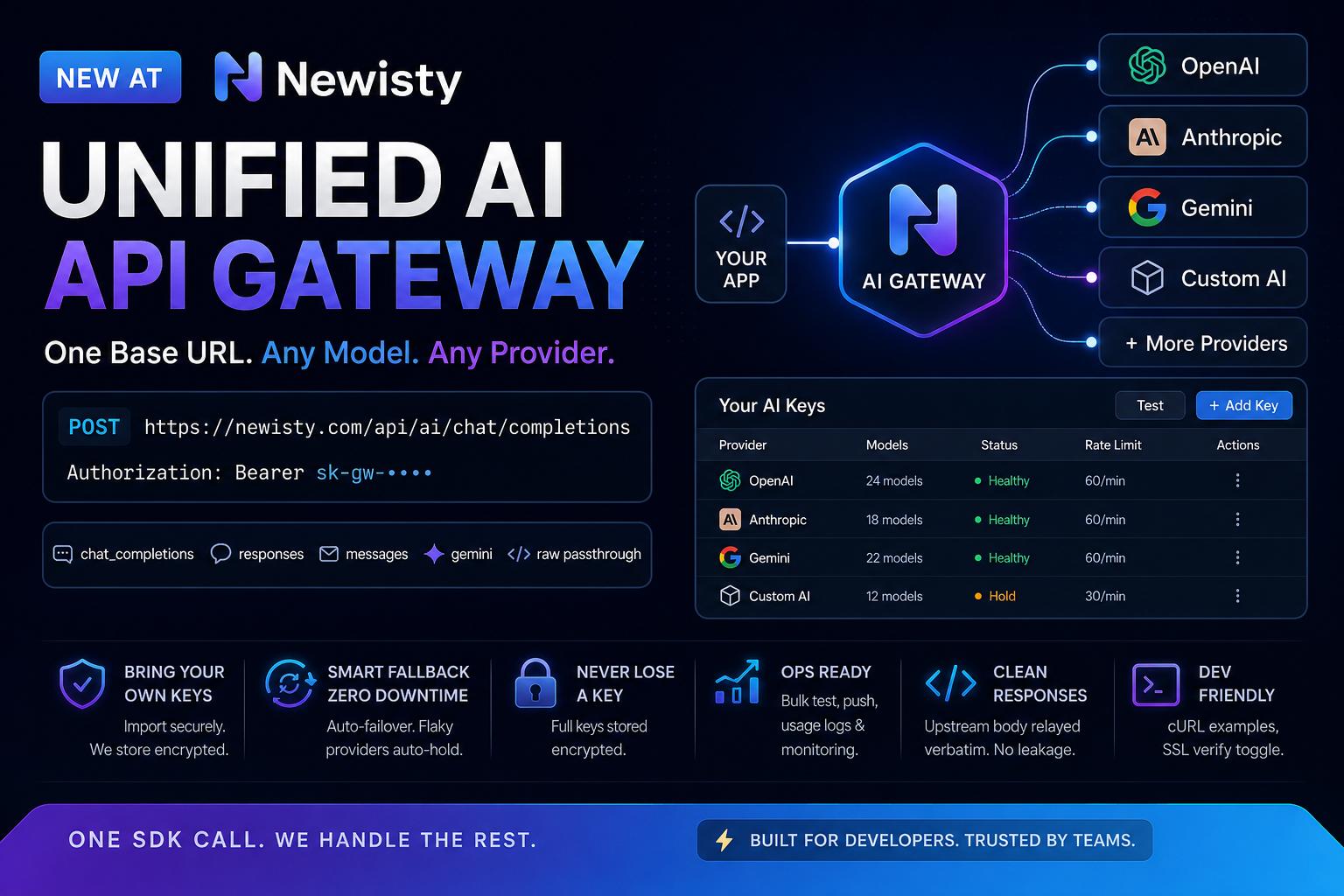
One Base URL for Multiple AI Providers
Instead of connecting your application directly to every provider, you can send requests through one Newisty gateway endpoint:
POST https://newisty.com/api/ai/chat/completions
Authorization: Bearer sk-gw-••••
Your application talks to the gateway, while the gateway handles the provider routing behind the scenes.
The basic idea is simple:
Your App → Newisty AI Gateway → AI Provider
You can work with different providers without changing the main API connection every time.
The gateway supports several request styles, including:
- Chat Completions
- Responses
- Messages
- Gemini
- Raw passthrough
You can also check the models available to your gateway key:
GET https://newisty.com/api/ai/models
The model list is filtered according to the permissions of your key.
Bring Your Own API Keys
One of the main features is Bring Your Own Keys (BYOK).
You don't have to depend on a single shared provider account. You can add your own provider credentials and control which models can be used through each gateway key.
Newisty supports importing keys from supported JSON exports, including hvoyai and custom_ai formats, as well as manual entry.
Imported data doesn't go directly into your provider configuration.
Instead, the gateway validates the import, shows the values in an editable review table, and lets you approve them before saving.
Provider credentials are stored encrypted.
Automatic Provider Fallback
Provider outages and rate limits are a normal problem when working with external AI APIs.
A request may work perfectly one minute and fail the next because a provider returns a server error or reaches a rate limit.
The Newisty gateway can use a priority-based fallback chain.
Your Request
     ↓
Primary Provider
     ↓
500 / Rate Limited?
     ↓
Next Provider
     ↓
Successful Response
You can configure an exact model route and define the provider priority.
If the first provider fails, the gateway can try the next available provider.
Providers that become unreliable can also be automatically placed on hold instead of being repeatedly used while they are unhealthy.
This can reduce the amount of provider-specific failure handling you need to write inside your application.
One Gateway Key, Controlled Access
Instead of exposing multiple provider credentials throughout your application, you can use Newisty gateway keys.
Gateway keys use the sk-gw- format.
Each key can have its own settings, such as:
- Allowed models
- Requests per minute
- Metadata injection
- Access restrictions
There is also a global throttle for controlling gateway traffic.
This gives you more control when different applications, customers, or projects need different access levels.
Clean API Responses
Another important part of the gateway is response handling.
The upstream response body can be passed back without unnecessarily changing the provider's response structure.
Newisty can add gateway information such as:
{
  "provider": "Newisty",
  "gateway": {
    "upstream_shape": "chat_completions",
    "inbound_shape": "chat_completions",
    "attempts": 2,
    "latency_ms": 812
  }
}
The same gateway information can also be provided through X-Gateway-* headers.
If you need the response to remain byte-for-byte compatible with the upstream response, metadata injection can be turned off for the gateway key.
The gateway also avoids exposing upstream provider details unnecessarily.
Monitor Usage and Provider Health
Managing several AI providers becomes much easier when you can see what is happening with your requests.
The gateway provides usage information such as:
- Request latency
- Token usage
- Provider attempts
- Provider status
- Model testing
- Usage logs
You can test individual models and providers before relying on them in production.
Provider actions can also be tested using their live values before saving configuration changes.
This makes troubleshooting easier when a model or provider isn't behaving as expected.
Useful for AI SaaS Applications
A unified gateway can be useful for several types of projects.
AI SaaS Products
If your SaaS application uses multiple models, you don't need to build separate provider integrations for every part of your application.
Your application can communicate with the gateway while provider configuration stays behind the gateway.
AI Wrappers
AI wrapper applications often need to support different models and providers.
A gateway provides a single connection point while keeping the provider routing separate from the main application.
Agencies
Agencies working on multiple AI-powered projects can manage provider credentials and model access from one place instead of maintaining separate integrations in every project.
Internal Tools
Companies can also use a gateway when different internal applications need access to different AI models.
Each application can receive its own gateway key and model permissions.
Example Request
A basic request can look like this:
curl https://newisty.com/api/ai/chat/completions \
  -H "Authorization: Bearer sk-gw-••••" \
  -H "Content-Type: application/json" \
  -d '{
    "model": "your-model",
    "messages": [
      {
        "role": "user",
        "content": "Hello!"
      }
    ]
  }'
Your application only needs to know the Newisty gateway endpoint and its gateway key.
The provider routing happens behind the gateway.
Why Use a Gateway Instead of Direct Provider Integrations?
Direct integrations are perfectly fine when your application only needs one provider.
The problem starts when the number of providers grows.
Without a gateway, your application may end up with:
Application
 ├── OpenAI integration
 ├── Anthropic integration
 ├── Gemini integration
 ├── Custom provider integration
 ├── Provider-specific error handling
 └── Provider-specific configuration
With a gateway, the structure can be simplified:
                 ┌── OpenAI
                 ├── Anthropic
Your Application → Newisty Gateway
                 ├── Gemini
                 └── Custom Provider
The application has one main API connection, while the gateway handles the provider side.
Built for Developers
The goal isn't to make developers learn another complicated system.
The gateway provides common API routes, cURL examples, model discovery, gateway keys, provider testing, usage logs, and configurable routing.
There is also an SSL verification option for testing providers that use self-signed certificates.
For developers who work with custom AI endpoints, raw passthrough support can be useful when the normal provider formats aren't enough.
One API Layer, Multiple Providers
AI development is moving quickly, and applications don't always stay with one model provider.
You may need a different model tomorrow because of cost, performance, availability, rate limits, or a new feature.
A unified gateway gives you a layer between your application and those providers.
Instead of rebuilding your application every time your provider setup changes, you can manage much of that routing from the gateway.
One Base URL. Any Model. Any Provider.
Newisty's Unified AI API Gateway is now available for early access.
Explore the developer documentation and see how the gateway works with your application:
View Newisty AI Gateway Documentation
#AI #LLM #APIGateway #OpenAI #Anthropic #Gemini #SaaS #DeveloperTools #APIManagement #Newisty
Related Posts