
GATE Photo and Signature Resizer, Converter and Compressor
Stressed about GATE 2027 photo & signature requirements? You're not alone. Thousands of GATE applicants get rejected every year for simple image mistakes - wrong size, incorrect format, or file too large.
Stop risking your application over technicalities. Newisty's free tool fixes your photos and signatures in 10 seconds to match IIT's exact 2025 specifications. Just upload, click, and download - no design skills needed.
Used by 45000+ GATE aspirants. 100% free. 100% accurate. Zero application rejections.
Utilisation GATE Photo and Signature Resizer, Converter and Compressor
Exam Photo & Document Tool
Drag & drop your image
JPG, PNG, WebP supported
Lire le contenu
Let's be real - GATE application photo requirements are confusing and strict. One wrong pixel dimension or file size, and your entire application could get rejected. We've all been there:
- ❌ Trying to resize images in Photoshop only to mess up the quality
- ❌ Getting error messages about "invalid file size" during submission
- ❌ Wasting hours on something that should take minutes
That's why we built Newisty. Our tool does exactly what the IITs require:
- ✓ Photos resized to perfect 530×690 pixels (within GATE's 200×260 to 530×690 range)
- ✓ Signatures at exact 580×180 pixels (meets GATE's 250×80 to 580×180 requirement)
- ✓ File sizes compressed to 5-600KB for photos and 3-300KB for signatures
- ✓ No quality loss - your image stays clear for verification
No signups. No watermarks. No hidden fees. Just a simple tool that works - because your GATE application deserves better than guesswork.
Table of Contents
[hide]
GATE Photo and Signature Resizer, Converter and Compressor
GATE Photo and Signature Resizer, Converter, and Compressor is a reliable online image editing tool, that is specially designed to resize your photo to 530x690px and signature to 580x180px, compress photo size between 5KB-600KB and signature size between 3KB-300KB, and also it can convert your photo and signature both into jpg, jpeg or pngformat in online for free. This tool is trusted by many users for its accuracy and commitment to following GATE guidelines. So, you can be confident that your images will be resized, converted, and compressed perfectly every time for GATE online application.
Why Does GATE Photo and Signature Size Matter?
Before we dive into the how, let's understand the why. The GATE exam is a highly competitive test that evaluates your aptitude in engineering and science. It's a gateway to prestigious postgraduate programs in top institutions across India. The GATE committee is meticulous about its requirements, including the size and format of the photo and signature submitted along with the application.
The GATE committee has set strict standards for photo and signature submissions. Your GATE photo should have a minimum dimension of 200x260 pixels, with a maximum dimension of 530x690 pixels, and it should be in JPG, JPEG, or PNG format. Additionally, the file size of your photo should fall within the range of 50KB to 200KB. Similarly, for your GATE signature, the committee specifies a minimum dimension of 250x80 pixels to 580x180 pixels, and it should be in JPG or JPEG format. The file size for your signature should be between 50KB and 150KB. These specifications are in place to ensure uniformity and compliance throughout the application process, allowing for efficient handling and processing of applications.
The Newisty Advantage for GATE
Navigating these technicalities can be a challenge, especially if you're not well-versed in image editing or don't have access to professional software. That's where Newisty comes to the rescue. Our user-friendly online tool is designed to make the process of resizing, converting, and compressing your GATE photos and signatures as simple as a few clicks.
User-Friendly and Efficient
Newisty prides itself on its straightforward and intuitive interface. You don't need to be a tech whiz to use our tool. It's as easy as uploading your existing photo and signature, selecting the desired dimensions, and letting our tool do the rest. Whether you're a tech-savvy individual or someone who's not too familiar with image editing, Newisty's design caters to all.
Compliance is Key
We understand that the GATE exam is a significant milestone in your academic journey, and compliance with their specifications is non-negotiable. Newisty ensures that your photos and signatures are not only resized but also converted to the necessary format. Our tool makes sure your images meet the criteria, giving you one less thing to worry about.
Faster and More Convenient
One of the standout features of Newisty is its speed. We know that time is of the essence, and waiting for an image editing tool to do its job can be frustrating. Newisty is optimized to get your images ready in a matter of seconds, ensuring you can complete your GATE application swiftly and with confidence.
Maintaining Image Quality
While resizing and compressing images, maintaining their quality is essential. Newisty employs advanced algorithms to ensure that your photos and signatures look crisp and clear even after modification. We understand that image quality is of utmost importance, and you certainly wouldn't want your GATE application to feature a blurry or pixelated image.
Security and Privacy
We understand the importance of security and privacy when dealing with personal images. Rest assured, Newisty takes your privacy seriously. Your images are processed and then immediately removed from our system, leaving no trace of your personal data.
GATE (The Graduate Aptitude Test in Engineering) Photo and Signature Size, Dimensions and format 2027
| GATE Document Name | File Size | Dimensions in Pixel | File Type | File Extension |
|---|---|---|---|---|
| GATE Passport size Photo | 5KB-600KB | 200x260px to 530x690pixels | JPG, JPEG or PNG | *.jpg, *.jpeg, *.png |
| GATE Signature (2cm x 7cm) | 3KB-300KB | 250x80px to 580x180pixels | JPG, or JPEG | *.jpg, or *.jpeg |
GATE Photo Size, Dimensions, Format 2027
- GATE Photo Dimension: passport size (3.5 cm Width × 4.5 cm Height)
- GATE Photo minimum dimensions are 200x260px and maximum dimensions are 530x690pixels
- GATE Photo File size: minimum 5 KB to maximum 1 MB.
- GATE Photo format: JPEG / JPG / PNG format
GATE Signature Size, Dimensions, Format 2027
- GATE Signature minimum dimensions are 250x80px and maximum dimensions are 580x180pixels.
- GATE Signature File size: minimum 3 KB to maximum 1 MB.
- GATE Signature format: JPEG / JPG format
[Video Tutorial] How to Resize, Convert and Compress GATE Photo and Signature 2027
GATE Photograph, Signature, Photo ID 2027 Offical Requirements
Photograph
Upload Color Photograph Upload a JPEG/JPG/PNG file only with minimum pixel resolution 200 x 260 and maximum pixel resolution 530 x 690. Aspect ratio (height : width) = 1 : R, where R must be between 0.66 and 0.89. Face must cover 60-70% of the photograph The file size should be between 5 KB and 600 KB.
Signature
Upload Signature The signature must be in blue or black only. Upload JPEG/JPG file with minimum pixel resolution 250 x 80 and maximum pixel resolution 580 x 180. Aspect ratio of signature (height - width) = 1 : R, where R must be between 2.75 and 3.75. Signature must occupy 70-80% of the image. The file size should be
between 3 KB and 300 KB. See Information Brochure for further details
Photo ID
Upload a PDF file with file size between 10 KB and 600 KB. The Photo ID must match the selection and details provided in the Personal Details tab.
Make your photo id here, Image to PDF converter

GATE Photograph and Signature General Requirements
The GATE 2027 application requires that the candidate’s photograph and signature have to be uploaded electronically. Uploading a photograph and signature that does not meet the specifications may eventually result in the disqualification of the application without any refund of the application fee.
GATE 2027 Admit Card and Score Card will contain the same photograph that you have submitted at the time of application.
GATE Photograph Specifications and Guidelines
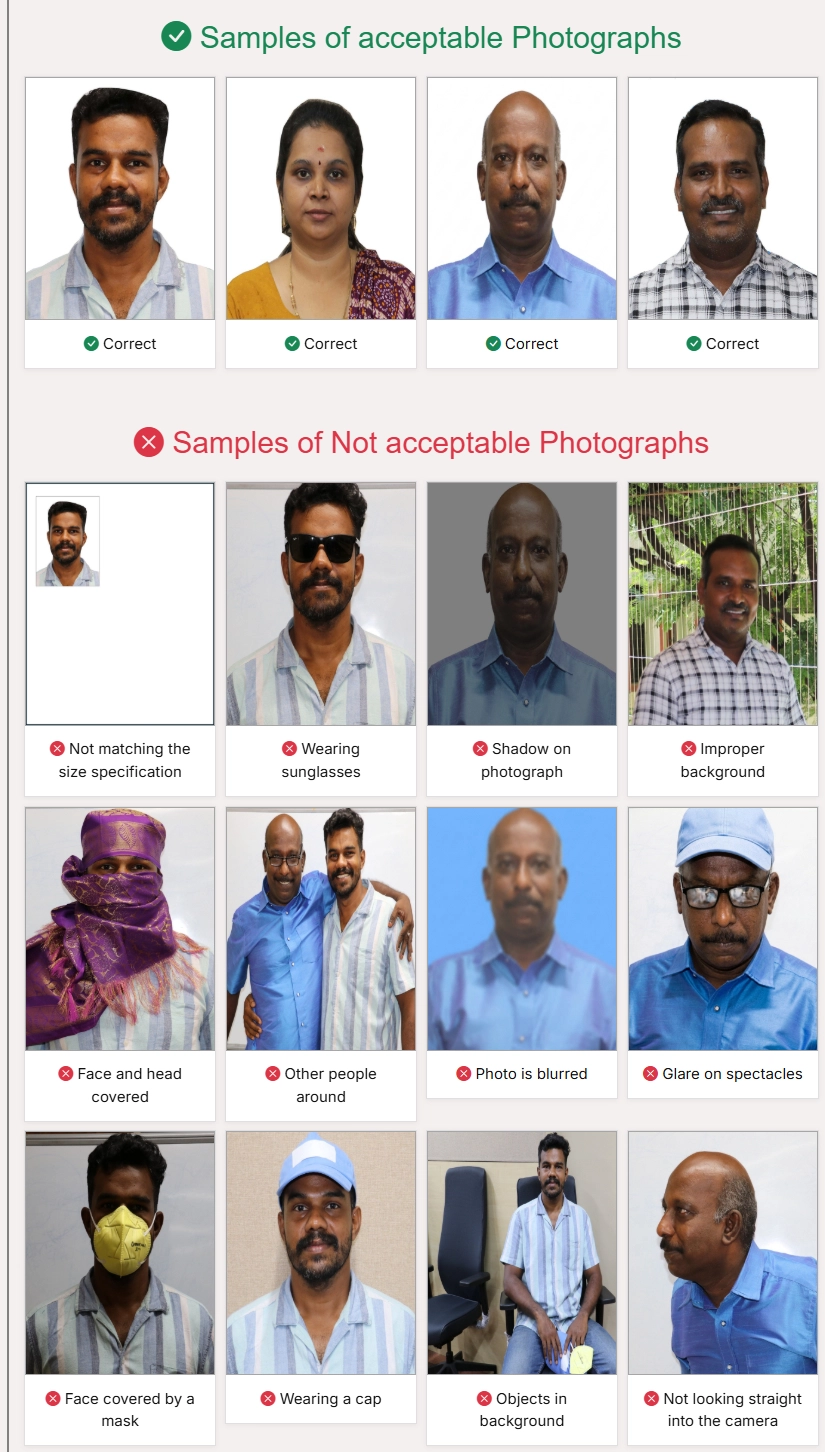
- Upload a good quality, color photograph of passport size (3.5 cm width × 4.5 cm height) with the face of the candidate covering 60-70% of the photograph.
- The background of the photograph must be white and not contain any other objects or persons.
- The photograph must show the frontal face view looking directly into the camera and must show the forehead, eyes, nose, and chin. The face in the photograph must not be covered with objects such as caps, hats, sunglasses, colored glasses, etc. Normal spectacles for vision correction are allowed. If the candidate normally wears spectacles, a photograph with glare on the glasses is not acceptable. If the glare cannot be avoided, the spectacles must be removed.
- Photograph can be in JPEG/JPG format with minimum aspect ratio of 0.66 and maximum aspect ratio of 0.89. After cropping the photograph, the face must cover 60-70% of the image.
- The maximum pixel resolution is 530 x 690 pixels and the minimum resolution is 200 x 260 pixels. The file size must be minimum of 5 kB and a maximum of 600 kB.
- The face must be visible clearly and not covered by any cloth or shadow.
- Photographs not adhering to the specified criteria could lead to rejection of your GATE application, and the application fee will not be refunded.
- Head coverings are not permitted except for religious reasons, but the facial features from bottom of chin to the top of forehead and both edges of the face must be clearly shown.
- Instruction for clicking/editing the photo image are given below-
- Face should cover A2, A3, B2, B3, C2 and C3 grids.
- Background should be plain and white colored.
- Eyes and face should be towards camera.

GATE Signature Specifications and Guidelines:
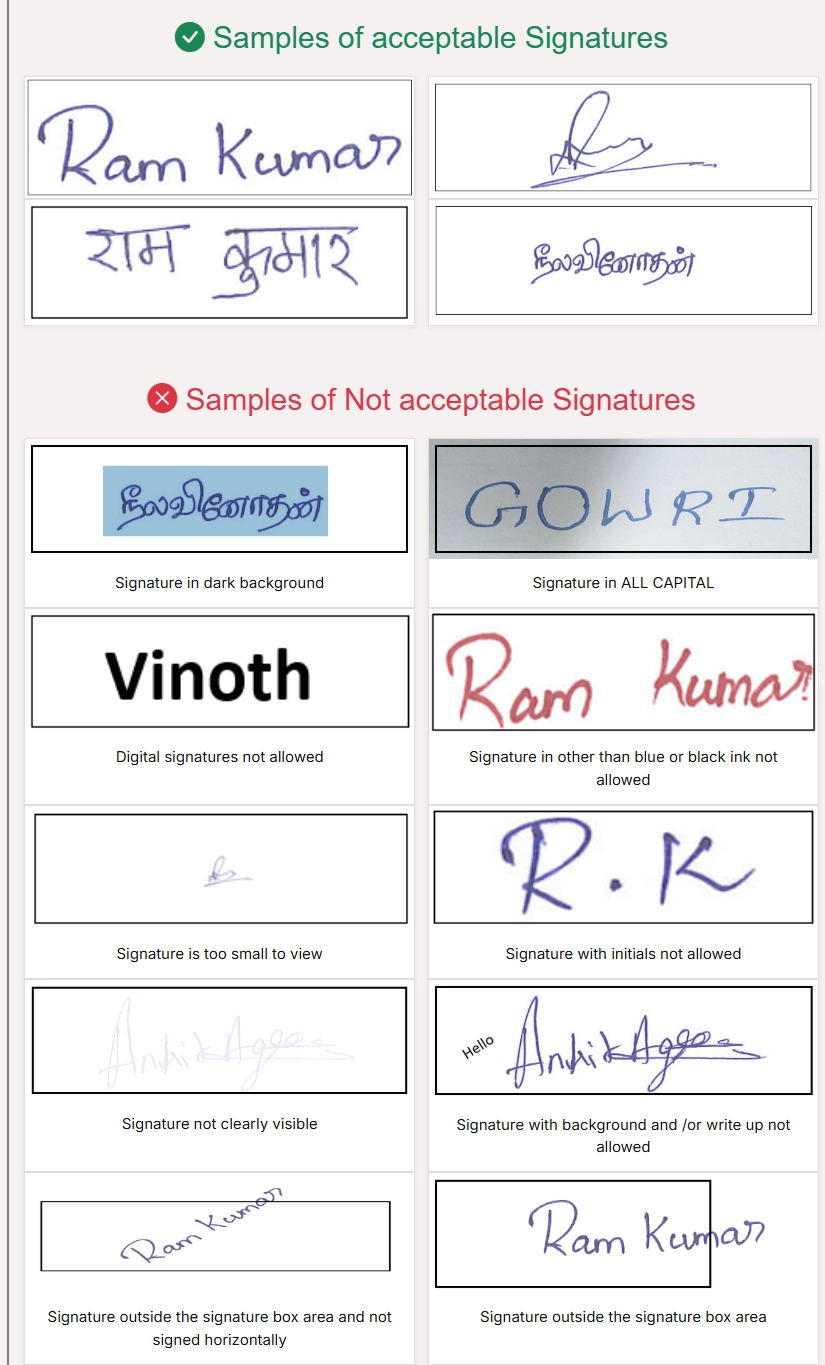
- Upload an image of your signature in JPEG/JPG format of size with an aspect ratio (height: width) of 1 : R, where the value of R can be between 2.75 and 3.75. After cropping to the mentioned size, the area of the signature must cover 70-80% of the image.
- The signature of the candidate must be in black or dark blue color ink only.
- The file size must be a minimum of 3 kB and maximum of 300 kB.
- The maximum pixel resolution is 580 × 180 pixels and the minimum resolution is 250 × 80 pixels.
- The signature must be signed only by the applicant and not by any other person.
- If the candidate’s signature does not match with the signature at the time of the examination, the applicant could be disqualified.
GATE Photo Sample
GATE Signature Sample
Your GATE Success Starts Here
In the competitive world of GATE examinations, attention to detail is paramount. With Newisty, you can take one more step toward your academic success. Our online tool offers a hassle-free solution to ensure that your GATE photos and signatures meet the latest requirements with ease. Say goodbye to application worries, and say hello to a future filled with possibilities. Join us at Newisty and give your GATE applications the advantage they deserve. Your journey to academic excellence begins here.
Read More from GATE 2027 Official Guidelines
GATE 2027 Important Dates (Registration Extended)
IIT Madras has extended the GATE 2027 online registration. Regular registration (without late fee) is now open till 5th October 2026 and extended registration (with late fee) till 12th October 2026.
| Activity | Date | Day |
|---|---|---|
| Opening Date of GATE Online Application Processing System (GOAPS) | 2nd September 2026 | Wednesday |
| Closing Date of REGULAR online registration (without late fee) | Monday | |
| Closing Date of EXTENDED online registration (with late fee) | Monday | |
| Opening Date of GATE 2027 Application rectification | 14th October 2026 | Wednesday |
| Closing Date of GATE 2027 Application rectification | 21st October 2026 | Wednesday |
| City allotment notification | 4th January 2027 | Monday |
| Admit Card download | TBA | TBA |
| GATE 2027 Examinations | 6th & 7th February 2027 13th & 14th February 2027 20th & 21st February 2027 |
Saturday & Sunday |
| Announcement of results | 19th March 2027 | Friday |
*All dates are liable to change. Source: GATE 2027 Important Dates
GATE related FAQ's
FAQ
Commentaires (1)
Décrivez le problème que vous avez rencontré afin que nous puissions l'examiner et améliorer l'outil.