
Exam Photo Tools
ツールの更新 1週間前
FPSC, PPSC Image Resizer, Compressor and Converter (Reduce Size)
Using this tool you can compress and reduce your FPSC, PPSC images to 20KB - 30KB and also your image will be resized automatically.
FPSC PPSC Photo
Signature Resize
Compress Image
Convert Format
使用方法 FPSC, PPSC Image Resizer, Compressor and Converter (Reduce Size)
Exam Photo & Document Tool
Resize, crop and format images to official exam
requirements
Select your exam
What are you submitting?
Upload your image
Drag & drop your image
JPG, PNG, WebP supported
Browse file
Crop & adjust
Optional
Adjust your image — or skip to use it as-is
Recommended for exam photo alignment
Keep the face centered inside the oval guide. For passport or exam-style photos,
try to let the face fill roughly 70% of the crop height.
Mode
Zoom
Rotate
0°
Flip
W:
—
H:
—
Add name & date
caption
Optional
Required by exam
Text is placed below the image — not printed on it
As it should appear on the form
Date of birth or exam date
Preview — name & date strip appears below the
image
Processing your image…
Resizing to exam specifications
ツールリンク
クリップボードにコピーされました。
シェア
このツールの改善にご協力ください
24.60K
所要時間
18.66K
ユーザー総数
4+ 年
提供済み
最終確認日:1週間前。利用状況の数値は、定期的な監査の際に更新されます。(報告開始日:21 Feb 2022)
不一致を報告する
コンテンツを読む
このツールの仕組みと、いつ使用すべきかについて学びましょう。
In FPSC or PPSC online application many applicant face problems in the image uploading section. Sometimes because of image size (Not More than 20KB-30KB) or sometimes image dimension (pixels). To Avoid these problems use Newisty FPSC, PPSC Image Resizer, Compressor tool.
How to resize and reduce FPSC and PPSC image size between 20KB-30KB:
- If you want Resize, Convert & Compress only. No Edit (crop, flip, zoom, rotate, move) then click on Only Resize, Convert & Compress. No Edit (crop, flip, zoom, rotate, move) option.

- Upload your photo

- Click Download button to save the image on your device
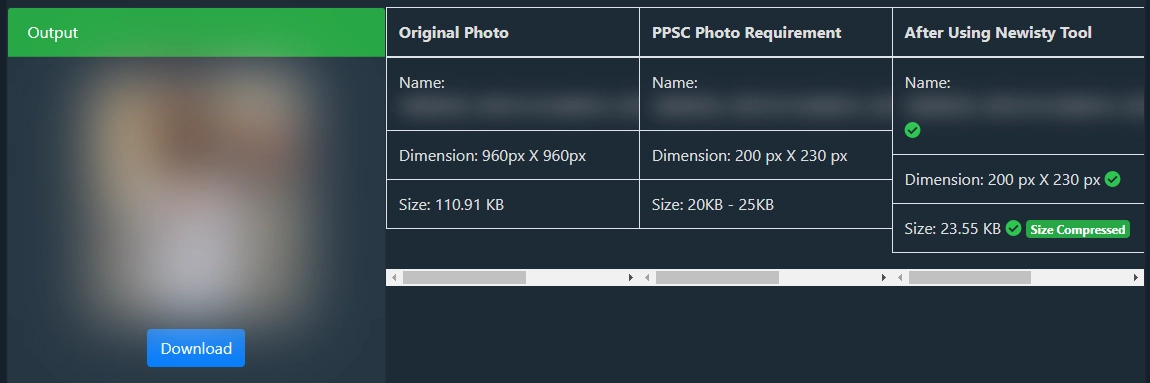
Resize and Reduce (Compress) image size for PUNJAB PUBLIC SERVICE COMMISSION (PPSC) or Federal Public Service Commission (FPSC).
コメント (0)
ユーザー間の議論、例外的なケース、および追加のヒントについて。
コメントを残す
コメントを送信すると、公開されます。
まだコメントはありません。ぜひ最初のコメントを投稿してください!
ぜひお知らせください!
このツールに関する問題を報告する
発生した問題について詳しくご説明ください。調査を行い、ツールの改善に役立てたいと思います。
最も役立つのは
入力内容、期待される結果、実際の結果、使用しているブラウザや端末、および必要に応じてスクリーンショットを記載してください。