
MPSC Photo and Signature Size Converter and Resizer
MPSC's photo and signature editor, converter, resizer and compressor can be used to resize photos and signatures to the specified dimensions (Width x Height): 125-130px x 150-170px for photos, and 125-130px x 50-60px for signatures.
Additionally, the converter can be used to convert images to the required JPEG format, and the compressor can be used to compress photos and signatures to a size of less than 50KB.
Gebruik MPSC Photo and Signature Size Converter and Resizer
Exam Photo & Document Tool
Drag & drop your image
JPG, PNG, WebP supported
Inhoud lezen
Table of Contents
[hide]
MPSC Photo and Signature Size in Pixel Converter
MPSC Photo and Signature Size in Pixel Converter tool will convert images required jpeg photo format and resize photo into required size width 125-130px X height 150-170px or 3.5x4.5cm and signature into (width 125-130px X height 50-60px) or 3.5x1.5cm (Width X Height) and compress photo and signature size less than 50 KB.
Error in MPSC Photo and Signature Uploading
Don't worry if you are getting errors for photo or signature dimensions or sizes in your MPSC (Maharashtra Public Service Commission) online application form - we can help! Our service will convert, compress, and resize your photos/images and signature to fit the required format and size (photo size 125-130x150-170px and signature size 125-130x50-60px). Just select your dream exam's image type, set your image dimension, upload your image, and voilà - your image is ready to upload without any errors!
MPSC Photo and Signature Size in pixel
MPSC Photo Size in pixel: 125-130 pixel Width and 150-170 pixel (125-130x150-170px) / 3.5x4.5cm.
MPSC Signature Size in pixel: 125-130 pixel Width and 50-60 pixel (125-130x50-60px) / 3.5x1.5cm.
MPSC Photo Size in pixel
MPSC photo dimensions are 125-130 pixel Width and 150-170 pixel Height or 3.5x4.5cm.
MPSC Signature Size in pixel
MPSC signature dimensions are 125-130 pixel Width and 50-60 pixel Height or 3.5x1.5cm.
MPSC Photo and Signature Dimensions, Size and Format
MPSC Photo Size, dimensions and format
MPSC photo dimensions are Width 125-130px and Height 150-170px / 3.5x4.5cm. Size less than 50 KB, JPG/JPEG format.
MPSC Signature Size, dimensions and format
MPSC signature dimensions are Width 125-130px and Height 50-60px / 3.5x1.5cm. Size less than 50 KB, JPG/JPEG format.
| MPSC Photo and Signature Size | |||||
|---|---|---|---|---|---|
| Exam Name | Type of Document | Image Height | Image Width | Minimum Size | Maximum Size |
| MPSC | Photo | 4.5 cm or (150-170px) | 3.5 cm or (125-130px) | 50KB | 50KB |
| 170px | 130px | ||||
| Signature | 1.5 cm or (50-60px) |
3.5 cm or (125-130px) |
50KB | 50KB | |
| 90px | 100px | ||||
How to Upload MPSC Photo and Signature in MPSC Profile
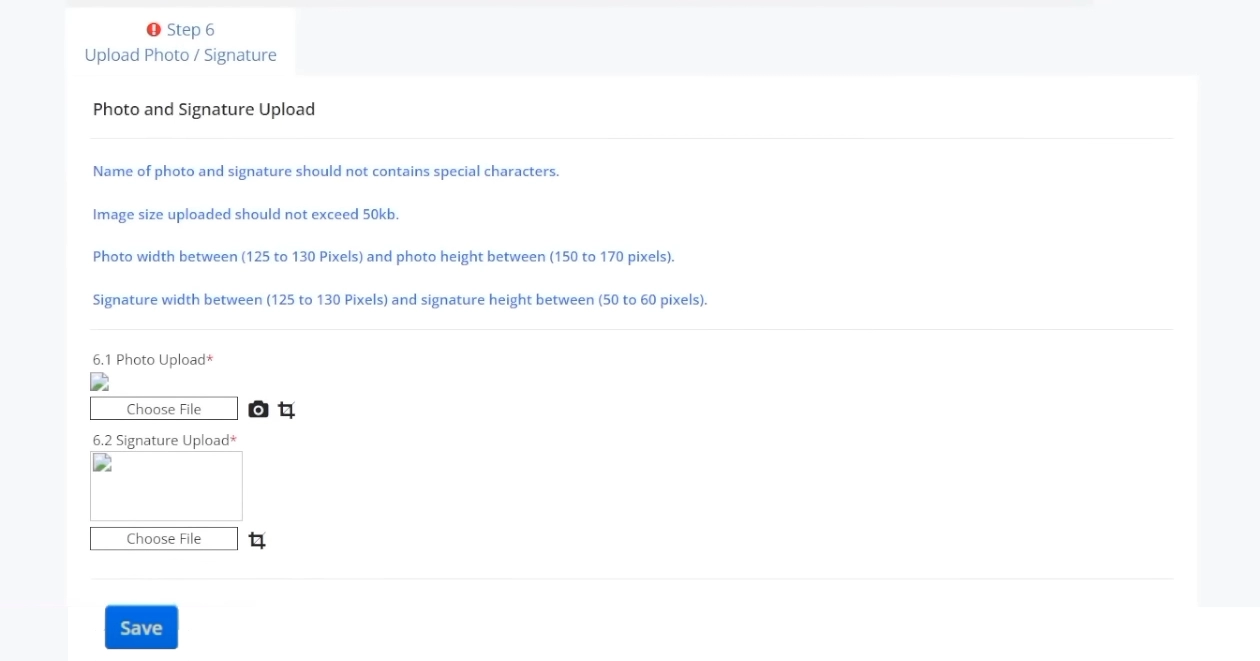
Step 1: In Photo Upload section from choose file option select your (125-130px) X (150-170px) [WidthxHeight] Photo.
Step 2: In Signature Upload section from choose file option select your (125-130px) X (50-60px) [WidthxHeight] Signature.
Step 3: Click Save Button to save uploaded image files
MPSC Photo and Signature GuideLines and Instructions
MPSC Photo Instructions and Guidelines
Scanned copy of applicant's recent photograph with following specification.
- Photograph should be in formals with Solid color (preferably Blue, Green, Red) background.
- Photograph must be a passport size colour picture.
- Photograph must be a taken in full face view directly facing the camera.
- Photograph should have no shadows and red eyes.
- Photograph size (breadth 3.5 cm * height 4.5 cm)
- Maximum size 50KB.
- Photo format should be .jpg or .jpeg only.
- File name should be of 10 character maximum
- Scanned Photograph should not have any other content, such as watermark, Stamp, name of mobile app used for scanning etc.
MPSC Signature Instructions and Guidelines
Scanned copy of applicant's signature with following specifications.
- Applicant should sign with black ink on a blank white plane paper and get the signature scanned.
- Scanned signature should not have any other content, such as watermark, name of mobile app used for scanning etc.
- The signature must be scribed only by the applicant and not by any other person
- Photograph size (breadth 3.5 cm * height 1.5 cm)
- Maximum size 50kb.
- Photo format should be .jpg or .jpeg only.
- File name should be of 10 character maximum
MPSC Application Form Guideline
MPSC Photo and Signature related FAQ
Veelgestelde vragen
Reacties (0)
Beschrijf het probleem dat u bent tegengekomen, zodat we dit kunnen onderzoeken en de tool kunnen verbeteren.