
TNPSC Photo and Signature Compressor, Resizer and Converter with Name Date on Photo
TNPSC Photo and Signature Compressor, Resizer, and Converter is a free image editing tool designed specifically for TNPSC 2026 applicants. It simplifies the process of compressing, resizing, and converting your TNPSC photos, signatures, and supporting documents as per the TNPSC photo and signature guidelines. Using this tool you can add your name and date to your TNPSC photo.
Also, you can crop and edit your photo, signature and support documents. And finally your images will be renamed according to TNPSC guidelines.
Just Drag and Drop your TNPSC documents, then it's our duty to prepare your image/documents, according to TNPSC instructions.
Utilização TNPSC Photo and Signature Compressor, Resizer and Converter with Name Date on Photo
Exam Photo & Document Tool
Drag & drop your image
JPG, PNG, WebP supported
Ler o conteúdo
Table of Contents
[hide]
TNPSC Photo and Signature Compressor, Resizer and Converter
TNPSC Photo and Signature Compressor, Resizer and Converter tool helps you to prepare your photo and signature by converting, compressing, resizing and renaming automatically according to TNPSC guidelines without any invalid size or dimension error in the online application form.
No need to download or install any app or software, no hassle. This tool is Supported by every device (mobile & computer), operating system, and browser. Compress, resize, and convert your TNPSC photo and signature easily, quickly, and securely.
Error in TNPSC Photo and Signature Uploading
Getting errors for (invalid image dimensions / invalid image size) photo or signature dimension or size in the TNPSC (Tamil Nadu Public Service Commission) online application form. Don't worry. We will help you to solve this problem. We will convert, compress and resize your photo/image and signature according to the required format (JPG) and size (Photo size 275x354 px or 3.5x4.5cm, 20-50KB and Signature size 275x118 px or 3.5x1.5cm, 10KB-20KB). Simply Select Your Dream exam's image type, and we will set your targeted image dimension, Upload Your Image, Boooom!! Your Image is ready to upload without any errors.
TNPSC Photo Dimensions, Size and Format |
|
| Dimensions | 3.5x4.5cm, 200DPI |
| File Size | 20-50KB |
| Format | JPG |
| Preferred Background | White |
TNPSC Signature Dimensions, Size and Format |
|
| Dimensions | 3.5x1.5cm, 200DPI |
| File Size | 10KB-20KB |
| Format | JPG |
| Preferred Background | White |
TNPSC 2026 Photo, Signature, and Support Document Size, Format and Dimensions Online
TNPSC 2026 Photo size, dimensions, and format
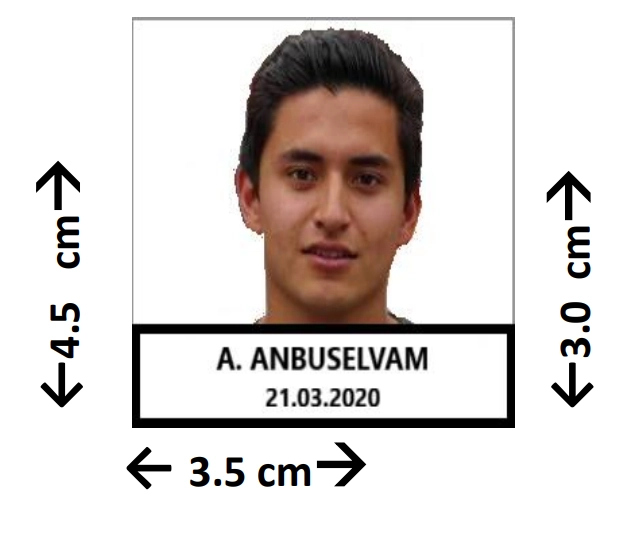
- TNPSC Photo Dimensions are 3.5 x 4.5 cm (275x354 px) and 200 DPI (width x height).
- TNPSC Photo Format is JPG.
- TNPSC Photo file size should be between 20KB-50KB.
TNPSC 2026 Signature size, dimensions, and format
- TNPSC Signature Dimensions are 3.5 x 1.5 cm (275x118 px) and 200 DPI (width x height).
- TNPSC Signature Format is JPG.
- TNPSC Signature file size should be between 10KB-20KB.
TNPSC 2026 Support Document size, dimensions, and format
- TNPSC Support Document Dimensions are 600 - 800px or 900-1200px (width x height).
- TNPSC Support Document Format is JPG.
- TNPSC Support Document file size is up-to 200KB.
TNPSC Group 2 Photo and Signature size, format, and dimensions
- TNPSC Group 2 Photo dimensions are 3.5cm / 275px (width) x 4.5cm / 354px (height), less than 50KB, JPG format.
- TNPSC Group 2 Signature dimensions are 3.5cm / 275px (width) x 1.5cm / 118px (height), less than 20KB, JPG format.
TNPSC Group 4 Photo and Signature size, format, and dimensions
- TNPSC Group 4 Photo dimensions are 3.5cm (width) x 4.5cm (height), less than 50KB, JPG format.
- TNPSC Group 4 Signature dimensions are 3.5cm (width) x 1.5cm (height), less than 20KB, JPG format.
Why Newisty's TNPSC Photo and Signature Compressor, Resizer, and Converter?
Keeping in mind TNPSC photo and signature guidelines and instructions, resizing image dimensions, changing image DPI, converting image format, compressing filesize, and renaming the image's name are a hassle. All these manual tasks take a lot of time and have a high risk of mistakes.
Keeping all the hassles aside, you just chill and relax. Because, Newisty's TNPSC Photo and Signature Compressor, Resizer, and Converter Tool will perform each and every task automatically for you as per TNPSC photo and signature guidelines. It will convert, resize, compress, and rename your documents automatically. So that you can upload all your documents without any problems and perfectly. Just upload your documents, select the documents type, take a break, and let us do the rest. No needed to download or install any other app or software.
Using Newisty TNPSC Photo Compressor, Resizer, and Converter, you can automatically
- Compress and reduce photo size within 20KB to 50KB
- Resize a photo to 3.5x4.5cm, 200 DPI.
- Convert photo format to JPG format.
- Rename your photo filename to ‘Photograph.jpg’.
And also using Newisty TNPSC Signature Compressor, Resizer, and Converter, you can automatically
- Compress and reduce the signature size within 10KB to 20KB
- Resize signature to 3.5x1.5cm, 200 DPI.
- Convert signature format to JPG format.
- Rename your signature filename to 'Signature.jpg’
Using Newisty you can convert your TNPSC image to PDF here, Convert TNPSC image to PDF.
[Video Tutorial] How to resize, convert and compress TNPSC photo and signature and Add name date on photo for TNPSC 2026
Everything is pre-configured for TNPSC photos, signatures, and other support documents. Now we will show you the best way to resize, convert and compress TNPSC photo and signature and how to add name and date on photo easily.
Step 1: Just select your TNPSC document type (Photo or Signature)
Step 2: If you do not want to add name-date then uncheck from Add Name Date option
Step 3: If you do not want to edit your TNPSC photo and signature (No Name-Date, No Edit (crop, flip, zoom, rotate, move), Only Resize, Convert & Compress) then click on Only Resize, Convert & Compress. No Name-Date, No Edit (crop, flip, zoom, rotate, move) option.
Step 4: Upload your TNPSC photo and signature image. After uploading, your TNPSC photo and signature will be resized, converted, and compress automatically according to TNPSC photo and signature guidelines.
Final Step 5: After all, processes click the Download button to save the processed photo, signature, and support documents to your device.
TNPSC Related Frequently Asked Questions
Perguntas frequentes
Comentários (8)
Could you tell me more about this problem?
To understand the problem, please provide some information
Did you have seen this video in YouTube "How to Resize, Compress, Convert TNPSC Photo and Signature in Mobile | Add Name and Date"
If yes then for your kind information we have updated the system. You will be happy to hear that now in the updated tool you can crop your image, add your name and date, resize and then finally compress your image according to TNPSC guidelines on a single page. No need to change or go to other pages.
To See about our new updated video of updated tool here the video is for you "How to Prepare, Compress TNPSC Photo and Signature, Resize, Add name date in Mobile"
This name should be `Signature.jpg`. Pls check & update ..
Thanks
Descreva o problema que encontrou para que possamos investigar e melhorar a ferramenta.