
APPSC Photo and Signature resizer, converter and compressor
APPSC Photo and Signature resizer converter and compressor tool will resize, convert and compress your photo according to APPSC Photo and Signature guidelines and instructions. Also it will merge your photo and signature in one file according to instructions.
Crop, rotate, flip, zoom Your Image to Remove unwanted parts from image. Here.

Crop images And then Resize Here
Sử dụng APPSC Photo and Signature resizer, converter and compressor
Exam Photo & Document Tool
Drag & drop your image
JPG, PNG, WebP supported
Đọc nội dung
Table of Contents
[hide]
APPSC Photo and Signature resizer, converter and compressor
According to APPSC Photo and Signature guidelines and instructions, APPSC Photo and Signature resizer will resize your photo to 3.5x4.5cm, 200 DPI and signature to 3.5x1.5cm, 200 DPI, compressor will compress your photo and signature size within 50KB and convert into jpg format.
Also, Newisty will help you to merge your APPSC Photo and Signature in one file and resize your entire photo and signature to 3.5x6.0cm, 200 DPI, compress your image size to less than 50KB and convert it into JPG format. You do not need to download or install any app or software. Because this tool is supported by all devices, Operating systems, and browsers.
APPSC Photo dimensions, size and format requirements
Your APPSC photo dimensions should be 3.5 cm x 4.5 cm (Width X Height), the photo resolution should be within 200 dpi, the file size should be less than 50KB .and in jpg format.
For more clarification see the table for APPSC 2023 Photo
| APPSC 2023 (Andhra Pradesh Public Service Commission) Photo Size, Dimensions and format | ||||
| Document Name | File Size | Dimensions | File Type | File Extension |
|---|---|---|---|---|
| APPSC Passport size Photo (3.5x4.5cm) | Maximum 50KB | 3.5x4.5cm | JPG | *.jpg |
APPSC Signature dimensions, size and format requirements
Your APPSC signature dimensions should be 3.5 x 1.5 cm (Width X Height), the photo resolution should be within 200 dpi, the file size should be less than 50KB .and in jpg format.
For more clarification see the table for APPSC 2023 Signature
| APPSC 2023 (Andhra Pradesh Public Service Commission) Signature Size, Dimensions and format | ||||
| Document Name | File Size | Dimensions | File Type | File Extension |
|---|---|---|---|---|
| APPSC Signature | Maximum 50KB | 3.5x1.5cm | JPG | *.jpg |
APPSC Merged Photo + Signature dimensions, size and format requirements
Your entire merged APPSC photo + signature dimensions should be 3.5 x 6.0 cm (Width X Height), the photo resolution should be within 200 dpi, the file size should be less than 50KB .and in jpg format.
For more clarification see the table for APPSC 2023 Merged Photo + Signature
| APPSC 2023 (Andhra Pradesh Public Service Commission) Signature Size, Dimensions and format | ||||
| Document Name | File Size | Dimensions | File Type | File Extension |
|---|---|---|---|---|
| APPSC Merged Photo + Signature | Maximum 50KB | 3.5x6.0cm | JPG | *.jpg |
Scanning & Uploading APPSC Photograph and Signature

Instructions for APPSC Scanning Photograph with Signature
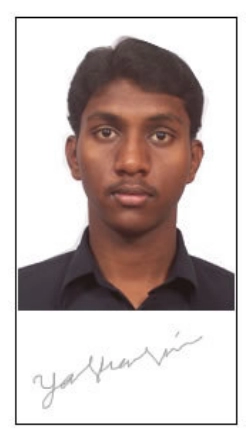
- Your entire size of the merged Photograph with Signature should be 3.5x 6.0 cm, 200 DPI, where 3.5x4.5cm is for the photograph and the rest of 3.5x1.5cm is for the signature.
- The entire image (of size 3.5 cm by 6.0 cm) consisting of the photo and the signature should be stored in *.jpg format on your device.
- Make sure that the size of the entire image (of size 3.5 cm by 6.0 cm) is not more than 50KB.
- A signature in CAPITAL LETTERS is not permitted.
- The signature must be signed only by the APPSC candidate and not by any other person
APPSC Sample Photo and Signature
APPSC Useful links
APPSC Photo and Signature INSTRUCTIONS
APPSC Photo and Signature Guideline
Bình luận (0)
Hãy mô tả vấn đề mà bạn gặp phải để chúng tôi có thể tìm hiểu và cải thiện công cụ này.