
OPSC ଫଟୋ ଏବଂ ସହି ପୁନର୍ଆକାର, କମ୍ପ୍ରେସର ଏବଂ କନଭର୍ଟର
ଓଡିଶା ପବ୍ଲିକ ସର୍ଭିସ କମିଶନ (OPSC) ଫଟୋ ଏବଂ ସହି ରିସାଇଜର, କମ୍ପ୍ରେସର ଏବଂ କନଭର୍ଟର ଟୁଲ୍
OPSC ଇମେଜ ରିସାଇଜର, କମ୍ପ୍ରେସର ଏବଂ କନଭର୍ଟର ଟୁଲ୍ ଆପଣଙ୍କ ଫଟୋକୁ jpg/jpeg ଫର୍ମାଟ୍ ରେ କନଭର୍ଟ କରି ଆବଶ୍ୟକ ଆକାରରେ ସେଟ୍ କରିଦିଏ (3.5 cm x 4.5 cm) କିମ୍ବା (W:275xH:354px), 25KB - 100KB ଏବଂ ସହି ଆକାର 3.5cm x 1.5cm କିମ୍ବା (W:275xH:118px), 10KB - 50KB, jpg/jpeg ଫର୍ମାଟ୍।
Crop, rotate, flip, zoom କରି ଅନାବଶ୍ୟକ ଭାଗ କାଟନ୍ତୁ।
ଏଠାରେ।
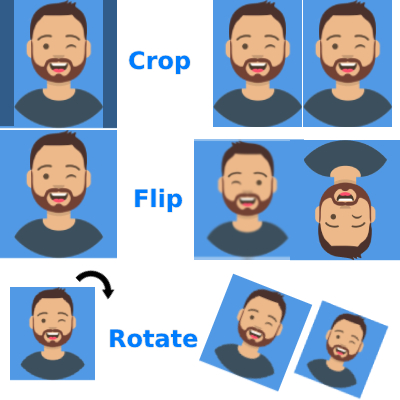
ଇମେଜ୍ କ୍ରପ୍ କରନ୍ତୁ ଏବଂ ପରେ ଏଠାରେ ରିସାଇଜ କରନ୍ତୁ
Use OPSC ଫଟୋ ଏବଂ ସହି ପୁନର୍ଆକାର, କମ୍ପ୍ରେସର ଏବଂ କନଭର୍ଟର
Exam Photo & Document Tool
Drag & drop your image
JPG, PNG, WebP supported
Read Content
ବିଷୟସୂଚୀ
OPSC ରିସାଇଜର, କମ୍ପ୍ରେସର, କନଭର୍ଟର ଏବଂ ଏଡିଟର
OPSC ଫଟୋ ଆକାର 3.5 cm x 4.5 cm (275x354px), 25KB - 100KB ଏବଂ ସହି ଆକାର 3.5 cm x 1.5 cm (275x118px), 10KB - 50KB, jpg/jpeg ଫର୍ମାଟ୍ ହେବା ଆବଶ୍ୟକ।
OPSC ଫଟୋ ଏବଂ ସହି ଅପଲୋଡ୍ ତ୍ରୁଟି
OPSC ଅନଲାଇନ୍ ଫର୍ମ ଭରିବା ସମୟରେ ଫଟୋ କିମ୍ବା ସହି ଆକାର ତ୍ରୁଟି ଆସୁଛି କି? ଚିନ୍ତା କରନ୍ତୁ ନାହିଁ। ଆମେ ଆପଣଙ୍କ ଫଟୋକୁ ଆବଶ୍ୟକ ଆକାର ଏବଂ ଫର୍ମାଟ୍ ଅନୁସାରେ କନଭର୍ଟ କରିଦେବୁ।
ଫଟୋ ଏବଂ ସହି ଆକାର
- ଫଟୋ: 3.5cm x 4.5cm (275x354px), 25KB - 100KB
- ସହି: 3.5cm x 1.5cm (275x118px), 10KB - 50KB
କିପରି ଅପଲୋଡ୍ କରିବେ
Step 1: ଫଟୋ ଚୟନ କରନ୍ତୁ
Step 2: ସହି ଚୟନ କରନ୍ତୁ
Step 3: Save କ୍ଲିକ୍ କରନ୍ତୁ
ନିର୍ଦ୍ଦେଶ
- ଫଟୋ ସ୍ପଷ୍ଟ ହେବା ଦରକାର
- ସହି କଳା ଇଙ୍କରେ ହେବା ଦରକାର
- ଫାଇଲ୍ 100KB ଠାରୁ ଅଧିକ ନହେବା ଉଚିତ
Comments (0)
Describe the issue you encountered so we can investigate and improve the tool.