
NSDL PAN Card Photo and Signature Resizer, Converter and Compressor
Using this free online NSDL PAN Card Photo and Signature Resizer you can resize, crop, convert, and compress your photo and signature to the exact PAN card specification. Select PAN card, upload your image, and download a file at 2.5 x 3.5 cm, in JPEG, under 500 KB.
Use NSDL PAN Card Photo and Signature Resizer, Converter and Compressor
Exam Photo & Document Tool
Drag & drop your image
JPG, PNG, WebP supported
Read Content
The two PAN application portals
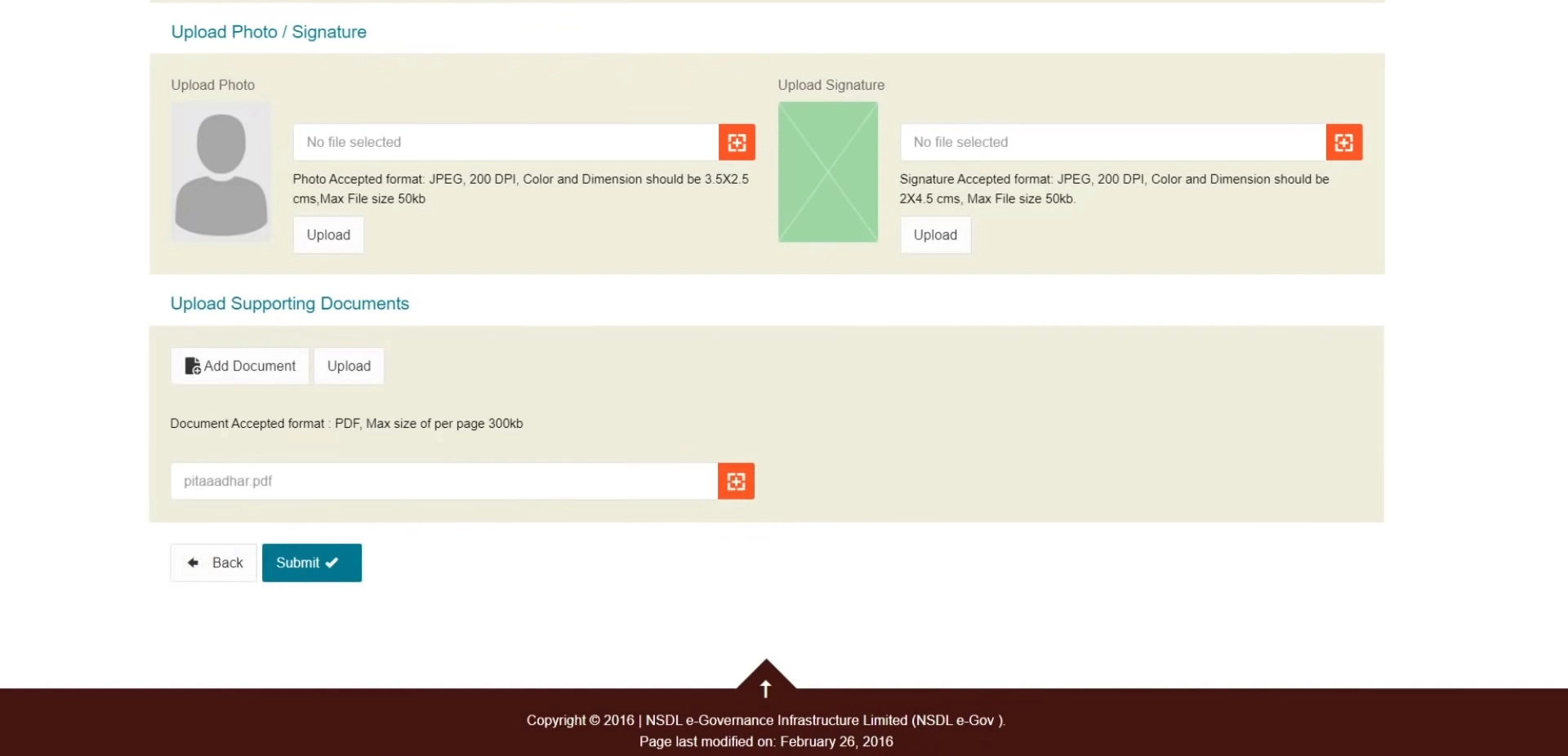
A PAN card is issued by the Income Tax Department of India, but online applications are routed through two authorised intermediaries, and their upload forms differ. Applications through the Protean eGov portal, formerly NSDL e-Governance, and applications through UTI Infrastructure Technology and Services each check the image differently, which is why the tool stores both sets of numbers rather than one. The physical card itself wants a print of the photograph sized 3.5 by 2.5 centimetres affixed to the acknowledgement, so the dimensions follow the printed card rather than a portrait convention.
That is why the geometry here is inverted and square rather than portrait. The NSDL rows take a 2.5 by 3.5 centimetre photograph and a landscape signature box 4.5 centimetres wide by 2 high, both at 200 DPI. The UTIITSL rows instead work in pixels: a 213 by 213 square photograph at 300 DPI within 5 to 30 KB, and a 400 by 200 pixel signature produced at 600 DPI inside 5 to 60 KB. That 600 DPI scan is the densest image anywhere on this site, and exists because a PAN application feeds a print onto the card plastic. Pick the bank of presets that matches whichever portal your application is actually filed through before you adjust anything else.
The board publishes its notices at tin.tin.proteantech.in. The numbers on this page come from the recorded specification, and the notice on that site is the authority whenever the two differ.
This page sets out the numbers PAN card actually asks for. It is not a general guide to cropping or to the tool interface, because those instructions do not change from one exam to the next and they are written up separately.
What the PAN card form asks you to upload
The application expects a pair of files, and each is checked on its own. They are:
- A photograph at 2.5 x 3.5 cm, no heavier than 500 KB and no lighter than 50 KB.
- A signature at 4.5 x 2 cm, no heavier than 500 KB and no lighter than 50 KB.
| Item | Size | Unit | Format | Max file size | Min | DPI |
|---|---|---|---|---|---|---|
| Photo | 2.5 x 3.5 | cm | JPEG | 500 KB | 50 KB | 200 |
| Photo | 213 x 213 | px | JPEG | 30 KB | 5 KB | 300 |
| Photo | 213 x 213 | px | JPEG | 500 KB | 50 KB | 96 |
| Signature | 4.5 x 2 | cm | JPEG | 500 KB | 50 KB | 200 |
| Signature | 400 x 200 | px | JPEG | 60 KB | 5 KB | 600 |
| Signature | 400 x 200 | px | JPEG | 500 KB | 50 KB | 96 |
The PAN card numbers, and why they matter
PAN card publishes its sizes in both units, which means the record is offering two ways to express the same kind of requirement. Pick the row that matches how your own advertisement is worded: centimetres when the notification states a physical frame, pixels when it states a resolution. They are alternatives published for different notifications, not a sequence to apply in turn.
The PAN card table lists DPI values of 600 and 300 and 200 and 96 against what is otherwise the same frame. Both entries describe identical dimensions, so the decision is resolution quality rather than size. Take the higher value unless the notification names the lower one.
Worth knowing that PAN card works in both directions. The photograph must be no larger than 500 KB and no smaller than 50 KB, and the signature no larger than 500 KB with 50 KB as its floor. Overshooting the ceiling is the usual mistake; undershooting the floor is the one that surprises people who compress hard.
The PAN card record offers 3 photograph options and 3 signature options: 2.5 x 3.5 cm; 213 x 213 px. These come from different notifications and different recruitment streams rather than from one form, so there is no single right answer to which to use. Take the size from the advertisement you are actually applying under, and if it names a size that is not listed here, enter it by hand in the width and height fields.
If the PAN card application refuses your file
- When PAN card refuses a file, weight is the first thing to check, because 500 KB leaves limited room. Look at the final size on the result card. If it sits above the limit, the source was cropped too loosely: tighten the frame and compress again.
- The signature is judged on its own 4.5 x 2 cm box and is not rescued by a correct photograph. If it is rejected, the usual cause is loose cropping: a signature scanned with a wide white margin carries more weight than the 500 KB allowance and fails even though the writing itself looks right.
- Two identical rejections usually mean the specification moved rather than the file. Compare the table above against the current notification before you generate a third attempt.
Official links from the original page
Images from the original page
Frequently Asked Questions
Cropping to a face, choosing a compression level, and the reasons a correctly sized photograph still gets refused do not vary by exam, so those are covered in one place rather than repeated here.
FAQ
Comments (1)
Describe the issue you encountered so we can investigate and improve the tool.