
UPPSC Photo and Signature Resizer, Converter and Compressor
UPPSC Photo and Signature Resizer, Converter, and Compressor Tool
Ensure your UPPSC photo and signature meet all the necessary requirements effortlessly with our UPPSC Photo and Signature Resizer, Converter, and Compressor Tool. This easy-to-use tool will:
- Resize your photo to 3.5 cm x 4.5 cm and your signature to 3.5 cm x 1.5 cm, perfectly matching the UPPSC guidelines.
- Compress the final image file size to under 50 KB, making it ready for quick upload.
- Convert the image to JPEG format, ensuring compatibility with UPPSC submission requirements.
With this tool, you'll save time and avoid any issues with your photo and signature uploads for UPPSC exams. It’s the perfect, hassle-free solution to get your application ready in no time!
(Apply Now) - UPSC Photo & Signature Resizer [Video] How to Resize, Merge, Convert and Compress UPPSC Photo and Signature [After Photo and Signature resizing] Merge UPPSC Photo and Signature in One FileGebruik UPPSC Photo and Signature Resizer, Converter and Compressor
Exam Photo & Document Tool
Drag & drop your image
JPG, PNG, WebP supported
Inhoud lezen
Table of Contents
[hide]
UPPSC Photo And Signature Resize Online
Resize your UPPSC photo to 5 cm x 6 cm and signature to 6 cm x 3 cm. The tool will resize them to the required 5 cm x 6 cm and 6 cm x 3 cm, 200 dpi, and in jpeg format for the UPPSC exam.
UPPSC 2025 Photo Size, Dimensions, and Format
UPPSC photo should be 5 cm x 6 cm, the resolution should be 200 dpi, the file size should be less than 50 KB, and it should be in jpeg format.
UPPSC 2025 Signature Size, Dimensions, and Format
UPPSC signature should be 6 cm x 3 cm, the resolution should be 200 dpi, the file size should be less than 50 KB, and it should be in jpeg format.
Final Size, Dimensions, and Format of UPPSC 2025 Photo and Signature
The final dimensions for the UPPSC photo and signature are 5 cm x 6 cm and 6 cm x 3 cm respectively, 200 dpi, and in jpeg format. After resizing your photo to 5 cm x 6 cm and signature to 6 cm x 3 cm, the images will be ready in the required format.
[After Photo and Signature resizing] Merge UPPSC Photo and Signature in One File
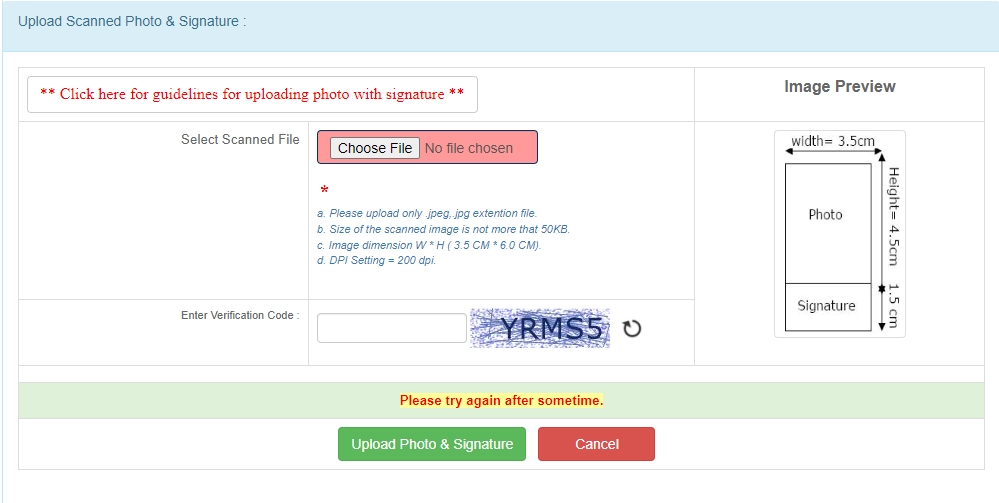
UPPSC Photo And Signature Size 2025
- UPPSC Photo dimensions are 5 x 6 cm, 200 dpi, less than 50 KB, and in jpeg format.
- UPPSC Signature dimensions are 6 x 3 cm, 200 dpi, less than 50 KB, and in jpeg format.
- UPPSC final Photo and Signature dimensions are 5 cm (width) x 6.0 cm (height), 200 dpi, and in jpeg format.

Error in UPPSC Photo and Signature Uploading
How to Upload Photo and Signature in UPPSC Form
Step 1: Resize your photo for UPPSC (5 cm x 6 cm) (Width X Height) here: https://newisty.com/uppsc-photo-and-signature-resizer-converter-and-compressor
Step 2: Resize your signature for UPPSC (6 cm x 3 cm) (Width X Height) here: https://newisty.com/uppsc-photo-and-signature-resizer-converter-and-compressor
Step 3: Your photo and signature are now ready for upload in the required dimensions, with proper resolution and size, without any errors.
Step: 4: Then Upload Merged Photo and Signature and Click Upload Photo and Signature button.
[Video Tutorial] How to Resize, Convert, Compress and Merge UPPSC Photograph with Signature
Guidelines for UPPSC Scanning Photograph with Signature
1. Paste the Photo on any white paper as per the required dimensions (5 cm x 6 cm). Sign in the signature space provided. Ensure that the signature is within the box.
2. Scan the required size containing the photograph and signature. Please do not scan the entire page.
3. The entire image dimension (5 cm x 6.0 cm) consisting of the photo along with the signature is required to be scanned and stored in (*.jpe, *.jpeg, *.jpg, *.png, *.tiff) format on your local machine.
4. Ensure that the size of the scanned image is not more than 50 KB.
5. If the file size is more than 50 KB, adjust the scanner settings such as DPI resolution, number of colors, etc., during the scanning process.
6. The applicant must sign in full within the box provided. Since the signature is proof of identity, it must be genuine and in full; initials are not sufficient. Signatures in capital letters are not permitted.
7. The signature must be signed only by the applicant, not by any other person.
8. The signature will be used on the Hall Ticket and wherever necessary. If the applicant's signature on the answer script does not match the signature on the Hall Ticket, the applicant will be disqualified.
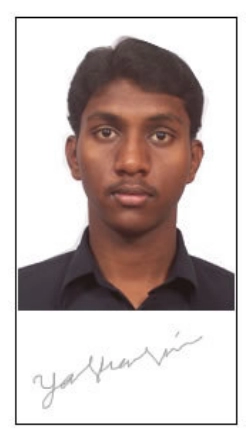
Example: The technical specifications of the sample scanned image shown above are:
• Size of the file < 50 KB
• DPI setting = 200 dpi
• True Color
Sample Image & Signature :-
UPPSC Photo and Signature Related FAQ
Veelgestelde vragen
Reacties (0)
Beschrijf het probleem dat u bent tegengekomen, zodat we dit kunnen onderzoeken en de tool kunnen verbeteren.