
Dhaka University (DU) Admission Photo Resizer, Converter and Compressor
Dhaka University (DU) Admission Photo Converter, Resizer, and Compressor is a free online tool to resize, compress, and convert images for the Dhaka University admission application. Crop, rotate, flip, and zoom your photo to meet the required minimum 450×550 px dimensions, 20 KB file size, JPEG format, and plain white background.
Dhaka University (DU) Admission Photo and Signature Resizer, Editor, and Compressor Online
استعمال کریں Dhaka University (DU) Admission Photo Resizer, Converter and Compressor
Exam Photo & Document Tool
Drag & drop your image
JPG, PNG, WebP supported
مواد پڑھیں
Dhaka University admission photo tool
This tool prepares your photo for the Dhaka University (DU) admission application. Resize, crop, rotate, flip, and zoom your image, then download it in JPEG format. The photo must meet the minimum 450×550 px dimensions, 20 KB file size, and plain white background requirement.
Upload your original photo, adjust the crop to centre your face, and process the image using the stored DU preset. You can use the tool on your phone or computer.
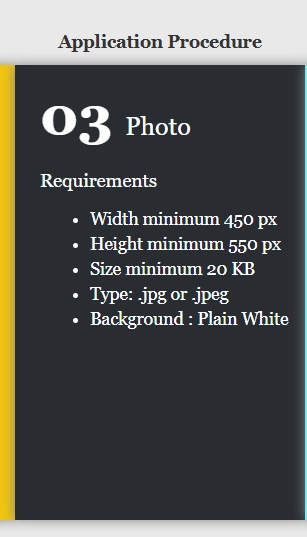
DU admission photo requirements
The following table shows the updated minimum photo requirements for the Dhaka University admission application.
| Requirement | Specification |
|---|---|
| Minimum width | 450 px |
| Minimum height | 550 px |
| Minimum file size | 20 KB |
| Maximum file size | Check current admission notice |
| Image format | JPG / JPEG |
| Background | Plain white |
Important: These are the updated minimum requirements. Check the latest DU admission circular for any additional instructions or maximum file-size restrictions before uploading.
How to prepare your DU admission photo
Use a recent colour photograph with a plain white background. Face the camera directly, keep your eyes open, and avoid hats, heavy shadows, and filters.
- Upload your original photo.
- Adjust the crop to centre your face.
- Rotate, flip, or zoom if needed.
- Select the stored DU photo preset.
- Process and download your JPEG photo.
Make sure your face is clear and neither the top of your head nor your chin is cut off.
Common photo upload errors
Your photo may be rejected by the DU admission portal for several reasons:
- Incorrect dimensions: The image is smaller than 450×550 pixels.
- File size too small: The image is below 20 KB.
- Unsupported format: The file is not JPG or JPEG.
- Incorrect background: The photo does not have a plain white background.
- Poor image quality: The face is blurry, too dark, or unclear.
If your image is too small, start with a higher-resolution original instead of enlarging an already compressed image. Always check the downloaded file before uploading it.
Before you upload
Open the processed image and check its dimensions, file size, format, and background. Keep your original photo until the DU admission portal accepts the processed version.
The tool only prepares your photo. It does not submit your admission application or store your application details.
Frequently Asked Questions
اکثر پوچھے جانے والے سوالات
Suggested Tools






تبصرے (2)
براہ کرم آپ کو درپیش مسئلے کی وضاحت کریں تاکہ ہم اس کی تحقیقات کر سکیں اور ٹول کو بہتر بنا سکیں۔