
NEET 2026 Image & Document Guide: Resize, Compress & Convert 100% accurately
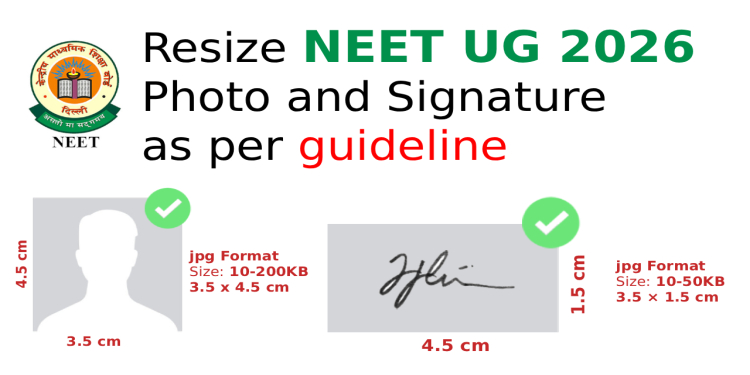
Table of Contents
[hide]
Are you preparing for NEET 2026 and struggling with photo, signature, and document formatting requirements? You're not alone! Thousands of students face rejection or delays due to incorrect image specifications. But worry no more – we've created the complete guide to help you navigate all NEET image requirements, plus introduce you to the ultimate solution that makes the entire process effortless.
Why Proper Image Formatting Matters for NEET 2026
Before we dive into the specifics, let's understand why getting your images right is crucial:
- Application Rejection Risk: Incorrect dimensions, sizes, or formats can lead to immediate rejection
- Exam Day Complications: Your uploaded photo will be used on attendance sheets and during counseling
- Legal Consequences: Uploading someone else's photo or fabricated images can result in criminal action
- Time-Saving: Proper formatting from the start prevents last-minute stress and re-uploads
Introducing Newisty NEET Photo & Signature Resizer, Compressor & Converter
Say goodbye to the struggles of manual image editing! Our Newisty NEET Photo and Signature Resizer, Compressor, and Converter Tool is specifically designed to simplify the entire process for you. Here's what makes it special:
Key Features:
- ✅ Automatic Resizing to exact NEET specifications
- ✅ Smart Compression to maintain quality while reducing file size
- ✅ Format Conversion (JPG, PDF, etc.)
- ✅ Name & Date Addition directly on your photo
- ✅ No Editing Required – just upload and get perfect results
- ✅ Multiple Document Support – photos, signatures, certificates, fingerprints, and more
- ✅ User-Friendly Interface – drag and drop functionality
- ✅ Fast Processing – instant results
Complete NEET 2026 Image Requirements Breakdown
1. Passport Size Photograph
- Dimensions: 3.5 cm × 4.5 cm (width × height)
- Resolution: 200 DPI
- File Size: 10 KB – 200 KB
- Format: JPG/JPEG
- Special Requirements:
- Must be taken after January 1, 2026
- 80% face visible (without mask), including ears
- White background
- Spectacles allowed only if used regularly
- Name and date must be added at the bottom
Pro Tip: Using our tool, you can easily add your name and date to the photo automatically!
2. Signature
- Dimensions: 3.5 cm × 1.5 cm (width × height)
- Resolution: 200 DPI
- File Size: 10 KB – 50 KB
- Format: JPG/JPEG
- Requirements: Clear, legible signature on white background
3. Postcard Size Photograph
- Dimensions: 4 inches × 6 inches (width × height)
- File Size: 10 KB – 200 KB
- Format: JPG/JPEG
- Quantity Needed: 4-6 copies
4. Left & Right Hand Finger and Thumb Impressions
- Dimensions: 2.5 cm × 3 cm (width × height)
- File Size: 10 KB – 200 KB
- Format: JPG/JPEG
- Requirements: Clear, legible impressions
5. Class 10 Certificate
- Dimensions: 800 px × 1200 px (width × height)
- File Size: 50 KB – 300 KB
- Format: PDF
- Requirements: Scanned copy, clearly legible
6. Class 11 Marksheet
- Dimensions: 800 px × 1200 px (width × height)
- File Size: 50 KB – 300 KB
- Format: PDF
7. Category Certificate (SC/ST/OBC/EWS/PwBD)
- Dimensions: 800 px × 1200 px (width × height)
- File Size: 50 KB – 300 KB
- Format: PDF
8. Citizenship Certificate/Passport Number
- Dimensions: 800 px × 1200 px (width × height)
- File Size: 50 KB – 300 KB
- Format: PDF
9. Address Proof (Present & Permanent)
- Dimensions: 800 px × 1200 px (width × height)
- File Size: 50 KB – 300 KB
- Format: PDF
Common NEET Photo & Signature Upload Errors (And How to Avoid Them)
❌ Error 1: Incorrect Dimensions
Problem: Photo is 4cm × 5cm instead of 3.5cm × 4.5cm Solution: Use our tool to automatically resize to exact specifications
❌ Error 2: File Size Too Large
Problem: Photo is 500KB when maximum allowed is 200KB Solution: Our compressor reduces size without losing quality
❌ Error 3: Wrong Format
Problem: Uploading PNG instead of JPG Solution: Our converter changes format instantly
❌ Error 4: Missing Name & Date
Problem: Photo uploaded without required name and date Solution: Our tool adds name and date automatically
❌ Error 5: Poor Quality/Blurry Images
Problem: Low-resolution or unclear images Solution: Our tool maintains optimal quality during compression
Step-by-Step Guide: How to Use Newisty NEET Tool
Step 1: Choose Your Document Type
Select from: Photo, Signature, Fingerprint, Certificate, or Postcard Photo
Step 2: Upload Your Image
- Drag and drop your file or click to browse
- Maximum file size: 200KB for initial upload
Step 3: Configure Settings
- Convert To: Select desired format (JPG, PDF, etc. - pre configured to JPG)
- Image Quality: Adjust compression level
- Resize Unit: Choose centimeters or pixels ( pre configured to cm)
- Dimensions: Pre-set to NEET specifications ( pre configured as NEET requirements)
- DPI: Set to 200 for photos/signatures
Step 4: Add Name & Date (For Photos)
- Check the "Add Name Date" option
- Enter your details
- Position automatically set at bottom
Step 5: Process & Download
- Click "Resize & Compress"
- Download your perfectly formatted file
- Ready to upload to NEET portal!
NEET 2026 Important Dates & Links
- Online Application Start Date: February 8, 2026
- Last Date to Apply: March 8, 2026
- Official NEET Website
- Apply Now
NEET Photo & Document Checklist
Before submitting your application, ensure you have:
- ✅ Recent passport size photo (6-8 copies needed)
- ✅ Postcard size photo (4-6 copies needed)
- ✅ Clear signature
- ✅ Left and right hand finger/thumb impressions
- ✅ Class 10 certificate (PDF)
- ✅ Class 11 marksheet (PDF)
- ✅ Category certificate (if applicable)
- ✅ Citizenship certificate/passport number
- ✅ Address proof (present & permanent)
- ✅ All documents meet size and format requirements
Frequently Asked Questions (FAQ)
Q: Is name and date mandatory on NEET photos for 2026?
A: Yes! According to NEET guidelines, candidates must add their name and the date of the photograph at the bottom of the photo. Our tool makes this easy with automatic addition.
Q: How many passport size photos do I need?
A: You need 6-8 passport size color photographs with white background.
Q: Can I use computer-generated photos?
A: No, Polaroid and computer-generated photos are not acceptable. Photos must be genuine and recent.
Q: What happens if I upload someone else's photo?
A: This is considered unfair means and can lead to application cancellation, criminal action, and legal consequences.
Q: Can your tool handle all NEET document types?
A: Absolutely! Our tool supports photos, signatures, fingerprints, certificates, mark sheets, and all other required documents.
Q: Do I need to crop or edit images before uploading?
A: No editing required! Our tool automatically resizes, compresses, and converts your images to perfect NEET specifications.
Pro Tips for Perfect NEET Images
- Take Photos Recently: Ensure photos are taken after January 1, 2026
- Use Good Lighting: Natural light works best for clear, well-lit photos
- Plain White Background: Essential for passport photos
- No Filters or Effects: Keep photos natural and unedited
- Test Before Final Upload: Use our tool to preview before submitting to NEET portal
- Keep Originals Safe: Store original high-quality images as backup
Why Choose Newisty NEET Tool Over Manual Editing?
Manual Editing Challenges:
- ❌ Requires photo editing software knowledge
- ❌ Time-consuming trial and error
- ❌ Risk of incorrect specifications
- ❌ Multiple tools needed for different documents
- ❌ No guarantee of NEET compliance
Newisty Tool Advantages:
- ✅ One-Stop Solution: Handles all document types
- ✅ NEET-Compliant: Pre-configured to exact specifications
- ✅ Time-Saving: Process completed in seconds
- ✅ User-Friendly: No technical skills required
- ✅ Reliable: Trusted by thousands of NEET aspirants
- ✅ Free to Use: No hidden costs or subscriptions
Sample NEET Photo Specifications
Here's what a perfect NEET photo should look like:
- Size: 3.5cm × 4.5cm
- Resolution: 200 DPI
- File Size: Between 10-200KB
- Format: JPG/JPEG
- Content: 80% face visible, white background, name and date at bottom
- Quality: Clear, sharp, no blur or pixelation
Security & Privacy Assurance
We understand the importance of your personal data. Our tool:
- ? Processes images locally in your browser
- ? Doesn't store your images permanently
- ? Uses secure connections
- ? Complies with data protection standards
- ? Deletes processed files automatically
Ready to Simplify Your NEET Application Process?
Stop struggling with image formatting and start focusing on what really matters – your NEET preparation! Our Newisty NEET Photo and Signature Resizer, Compressor, and Converter Tool is here to make your life easier.
Click Here to Try Our Tool Now
What Our Users Say:
"This tool saved me so much time! I was rejected twice for incorrect photo sizes, but after using Newisty, my application was accepted immediately." – Priya S., NEET 2025 Aspirant
"The name and date addition feature is a game-changer. No more manual editing in Photoshop!" – Rahul M., Medical Student
Final Thoughts
Preparing for NEET is challenging enough without worrying about technical image requirements. With our comprehensive guide and powerful tool, you can ensure your application meets all specifications perfectly. Remember:
- ✅ Follow all dimension and size requirements
- ✅ Add name and date to photos
- ✅ Use recent, clear images
- ✅ Test your images before final submission
- ✅ Keep backups of all documents
Don't let image formatting issues stand between you and your medical dreams! Try our tool today and experience the convenience of perfect NEET-compliant images in seconds.
Need Help? Contact us at [email protected] or visit our Help Center
Share this guide with fellow NEET aspirants! ?
Related Posts
How to convert HTML webpage to PDF without using any third party tools, using browser
As a beginner, how do you start investing and what strategy should you follow?
How to Resize, convert and compress JAM photo and signature without any errors
Surviving the Cloudflare Outage: How We Got Newisty Back Online in 60 Seconds